

Indie game storeFree gamesFun gamesHorror games
Game developmentAssetsComics
SalesBundles
Jobs
TagsGame Engines

Pixel Rebirth

155
Posts
1
Topics
30
Followers
16
Following
A member registered Nov 21, 2016 · View creator page →

Creator of

Recent community posts

Unfortunately that's a thing that cannot happen with the current state of the plugin as explained in the following topic: /t/6214581/when-will-additive-effect-will-be-supported-on-the-ui

Let me also mention that a few effects can be added to the 3D view as lens effects (Chromatic Aberation, Edge Blur, Distortion).
If you have a more complex issue or something interesting to share feel free to make a new topic about it.

Preferably in english if you can so most people are able to engage with it.

What filters are we talking about?

Hey, that's a nice implementation of player movement and interaction. 

Are you going to make this into a full game or you're just tinkering?

Skyboxes should in fact not be broken as far as I can tell. However with update 0.954 from last december jpg files no longer work. You will have to use png images instead.

In short: No, Babylon.js does NOT automatically do something like adjusting rendering quality based on distance.

I'm no expert but it might simply be that the fragment processing cost is lower when the model occupies a smaller part of the screen while it becomes more expensive when it's in full view close up. Which would be expected to a certain extent and you also mentioned ("smaller number of pixels on screen").

Of course I do not know what kind of model you're using and what hardware you're running. In most usual cases I wouldn't be expecting a huge difference though.

Thank you for checking it out so soon and providing the example.

If we are getting a somewhat consistent yet still faulty behavior that's still a step forward in my book, hehe.

It appears to me I may have simply forgot to set "hasAlpha" to "true" again when using the "Set mesh texture" action.

Therefore I have updated the download again (same version). Please just get it again and replace the main plugin.

In my brief testing as far as I can tell things do work actually correctly.

Oh I saw you mentioned a "bonus bug" relating to a behavior camera which I will look into also. In general though let me mention that I highly recommend for most scenarios especially regarding your main game camera to use cameras created by the main plugin instead. There are issues with behavior cameras that do not affect regular cameras.

Thank you. The update is live btw.

(2 edits)

Thank you for providing so much information regarding your issue.

I'm actually pretty sure of the reason why this is happening. There is a performance optimization "blockMaterialDirtyMechanism" being used in the plugin which will under certain circumstances (camera not looking at the mesh for example) prevent materials from being updated correctly.

Some actions that relate to materials already disable this briefly so the changes can be applied. "Set mesh texture" currently does not.

However that will change with the upcoming update and I'm fairly confident this will solve your issue at least partly. I'm not too certain about the layout change problem you're describing and what actually happens there.

So in case the upcoming update doesn't fully fix this issue please do provide an example file.

Well, the answer is a bit complicated.

Very old versions of the plugin didn't require any spritesheets. Instead the current frame would be injected at runtime as the texture of the mesh no matter what.

Now while inelegant this technically worked suprisingly well but as I came to realize ONLY in preview. Because when exported Construct uses a spritesheet itself and simply injecting the image, while fine in preview, would now result in a very faulty texture using the whole spritesheet for any frame basically.

In theory the workaround could be (I haven't actually applied it at any point) to read out the coordinates for the frames Construct creates and then use those to inject the current frame correctly again.

But in general injecting the frame at runtime isn't optimal and it's much cleaner to let Babylon.js have its spritesheet like it's designed to work.

Animations will still be set up and can be altered in the C2 editor in terms of animation and frame speed, loop settings and so on.

If you have what I would call a regular workflow for your graphics/animations creating them in an application like say Asesprite the only additional step is exporting the whole thing as spritesheet and adding it to your project.

Make sure your C2 animation order isn't different from the spritesheet (if idle animation is first those frames need to appear first in your spritesheet, then the frames of the second animation and so on) and it will work. Technically you can even use empty frames in the C2 editor and set it up like that.

So to summarize from my perspective it's the best solution to simply import a spritesheet which is trivial for most usual workflows. It avoids injecting frames at runtime which in itself might cause unforseen issues.

Let me know your thoughts.

Yes, it could in fact help a lot with performance if you wanted to use a shadow generator as a simple shadow map for static geometry.

For this kind of purpose there will be the option to only render the shadows once initially in the next update.

The model comes up grey in blender and windows model viewer as well so it's a general issue with it.

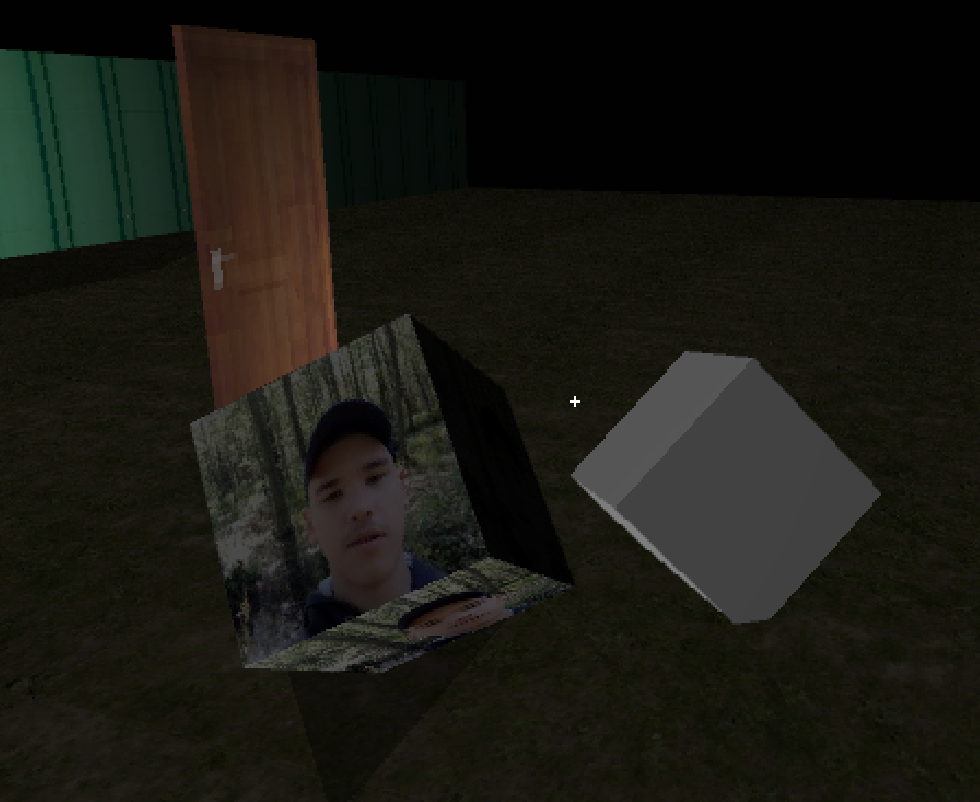
In case you just want a cube with the picture on each side you can simply use the box behavior (set 'Tiled' property to 'No') like seen here:


I did request access but haven't received it yet.

If you can share the .capx or model file so I can look into the issue.

You're right it doesn't actually work anymore. The fix will be part of the next update.

Are you having trouble with high RAM usage? 

You just destroy models to get rid of them.

You can see how to use shadows in one of the examples (baby3dSimpleExample.capx) that come with the plugin.

If you export a model in obj format you should have three files: .obj, .mtl and the texture (.png/.jpg).

All of them need to be imported into your project folder for obj models to work correctly.

For sprite objects with the plane behavior you need to add a spritesheet in your project folder. 

If you know you do not need animations use a tiled background object instead which does not require this step.

Do you mean as a property or where do you want to enter those parameters?

Okay so we are talking about the box behavior.

Actions to change UV at runtime (for box and plane) will be added to the next update.

(1 edit)

Unfortunately I'm not sure I'm understanding your question correctly.

If you're trying to scale an imported model after the fact this action is missing currently. The next update will add it.

EDIT: Update is released!

The only behavior that can obey to runtime changes in dimensions is Plane (Resize property). However it does this by disposing and creating the mesh anew which is not a particularly elegant solution.

Now all mesh behaviors should be able to follow changes in dimensions by scaling. Will very likely be included in the next update.

If you need to do this currently you'll have to scale yourself via events.

You're supposed to add B3D Model objects for different model files. That's how it's designed to work.

If you were trying to do something like a model viewer or level editor (did you mean that by "customize the level"?) this would indeed become a problem. Something like the "Override" action of the box behavior could remedy this.

Again though for a regular game it's not necessary. I'll see about bringing "Override" to other behaviors/plugins.

How would this be different to just making your event system create the desired model? Other than avoiding a bigger event tree and multiple objects... 

I guess I'm curious what exactly you're trying to achieve here.

Since the plugin uses its own canvas blend modes or effects used on Construct 2 layers won't take effect.

Sadly there isn't really a workaround for this other than making the plugin render to a texture instead that then would be it's own C2 plugin to be placed on a layer - I believe this is what the Q3D plugin did for example.

I have mentioned in other places that this was also my initial plan which I failed at and fell back on the straightforward additional canvas solution. I also said I may be revisiting this at a later date. 

Be aware though such a change wouldn't be trivial and require reworking any projects you may already have too. It's not a can of worms I plan to open any time before 1.0 to be honest.

I'm sorry if this makes things difficult for your project.

(1 edit)

Please give me the link to this model if you can (is it a free asset?) so I can test it out for myself.

If a complex model gets saved again with different options the output of Babylon.js might become weird, I will say that much... but I would require an example model that demonstrated a general problem.

Appears to work fine for me. Are you using the correct naming convention?

If you share the capx I will take a look.

But that's what I want to know. You're having a specific issue?

May I refer you to this topic: /t/5595165/how-does-the-skybox-work

Sure it just needs to be a doublesided mesh in Babylon.js/ have no backface culling.

Are you talking about using the "Add sphere" action here? Because that one has been there a long time just for testing and doesn't really provide anything in the way of manipulating the sphere beyond positioning.

So yes what you're asking is perfectly possible but unless you're using an imported sphere model that's properly set up in the way you suggest you will not have much luck with the things the plugin provides directly.

Maybe that should change.

There's two places you need to take a look at in that example. 

First the property "Multi-face" needs to be set to "Yes" to get a unique image on each side of the box.

Then open the tiled background image of the box in Construct 2 and you will see that it's a strip of six 16x16 images making a 96x16 texture.

The first 16x16 is the left side, second right side, then front, back, top and down. You have to think of the front face looking in direction of the angle the box is facing. 

Let me know if this helps you. Happy easter!

In a scene like this or even a significantly bigger one it doesn't matter much if you switch to lower resolution texture manually.

Are you running into any issues like low performance or what's the reason for wanting to apply some kind of LOD system here? 

Babylon.js doesn't know about any textures you may have in your Construct 2 project folder until you use them with "Set mesh texture".

Currently the previous texture however stays in memory when you use the action. With the next update this changes and the texture will be disposed.

(1 edit)

I have already checked it out and made the necessary alterations.

Since it was saved with my current unreleased version of the plugin it has the potential to give you errors when opening. So I would want to hold off until the next update releases which will be later this week.

If you absolutely cannot wait here it is, but you've been warned: https://www.dropbox.com/scl/fi/ml2kqs716uotxqtrp8o06/forJDev.capx?rlkey=ildk4l8b...

I still left a little challenge in there for you. While jumping is implemented there are no checks for hitting something above you, so you will currently get pushed out when doing that. Once you understand the events you should be able to add that functionality yourself. Cheers!

There are actually quite a few issues with texture management I have to admit, so you are correct to question this.

While materials should already be disposed of properly in most circumstances, I was ignorant so far to the texture situation itself.

Improvements are planned for an upcoming update where materials automatically get rid of their textures. But this will unfortunately not address "Set mesh texture". 

Proper texture management in the future (before 1.0) will have the aim to dispose of any texture in memory that is not currently used by any object and also probably provide shared textures for non-instanced objects.

Speaking more generally I don't know if it's the best approach to load/dispose the texture every time for a supposed LOD change. What kind of objects/behaviors are you trying to apply a level of detail system to like this? And are you using large textures?

Basically you just add a jump value to the player Z position which you decrease every tick by some gravity value. Then increase the gravity by some factor once you're falling again (for a better less floaty feel).

Of course you need to implement checks to see if the player is on ground. This has to be your own event logic. Check for overlaps and compare Z top positions of your geometry to the player bottom position (feet if you will) and also player top for colliding above when jumping - alternatively you could also use ray picking for this which will probably run faster but might introduce some other difficulties.

In general using some kind of state machine (via the plugin of the same name is pretty handy) helps in such endeavors.

If you want to I can still take a look at your capx file, sure.

Thank you! I did grant access to the file just now.

Using "Load models" is not necessary anymore since version 0.97. Since it gives you an alert this also indicates to me you are not actually using the latest version of the plugin. Please update.

(1 edit)

Here's the most minimal example of showing a model: https://drive.google.com/file/d/11-Wg3IkP4sJ06jPNEezIQ4tLTNtil12D/view?usp=shari...

Error "0" doesn't seem right do you have a screenshot of this (with console) or maybe even an example file?

So I went ahead and made this slightly trippy white void version of a basic third person camera and controls.

https://drive.google.com/file/d/1R-o6JJ-MscUvzhFbKllTcb9AjJB8Idex/view?usp=shari...

Check it out it should answer most of your questions when you study it (it's only 13 events). 

WASD moves the character box, mouse moves the camera around it. Mouse wheel up/down zooms in/out.

Oh yeah this example requires the Simple Mouselock plugin.

For a third person view like this you should create a camera that is at a certain radius from the character while always looking at it and offset in elevation (Z) to look from above basically.

Something similar is shown in the 8 direction billboard example where the camera rotates around the billboard character in the center.

Now when you simply slap 8 direction movement on your character you will get probably undesired results since the character is not moving relative to the perspective (regular third person movement) or depending on where the character is facing (tank controls).

For first person controls (which does not apply here) and tank controls I'm actually using an edited version of the 8 direction behavior called wasd movement which is adjusted to move its object relative to its angle and defaults to w,a,s and d instead arrow keys. Maybe I should share this at some point.

For regular third person movement, which I haven't actually used myself in anything I've created with Baby 3D yet, you should apply vectorX and vectorY of the 8 direction movement behavior relative to the camera angle. Unless I'm totally thinking of something stupid and wrong right now...

If this doesn't help enough I guess I can cook up an actual example in the next few days