
Indie game storeFree gamesFun gamesHorror games
Game developmentAssetsComics
SalesBundles
Jobs
TagsGame Engines

You must be 18+ to view this content

Formamorph may contain content you must be 18+ to view.

The creator of this page has specified that it contains mature themes and content. Please enter your birthdate to verify you are 18 or older:

or Return to itch.io

Formamorph

Every choice transforms your body and shapes your adventure · By FieryLion, Jake James

Bug Reports Sticky

A topic by FieryLion created Feb 12, 2025 Views: 29,883 Replies: 478
Viewing posts 146 to 165 of 165 · Previous page · First page
(+1)

So my thing is it's the update all together tho it looks cool it does have issues. Like when you download the new world it ask either to keep the same size or downgrade . Then there's the paragraph issue, instead of putting out a a nice lengthy detailed paragraph, it's just short and dull then there's the choices no matter what you type it'll give the same respond choices . So in short this was a terrible idea and Im not hating or being rude it's just the old one was better simpler to maintain 
Developer

Old version is still available to download, so you can use that instead. 

How 

Developer

By downloading it to your computer

all my data from 1.2.0 isn't being carried over to the new version :(

Developer

on what platform?

windows

Developer

best way is to export each thing you want carried over from v1.2 and then import them all into v2.4.0. I added multi-importing so that part should be fast. just the exporting will be time consuming.

was rather long but i done it 

Developer

sweet, let me know if you run into any other issues. 

immediately ran into an issue where i can't start a game, it just keeps saying "failed to process AI request" and "Failed to complete action. Please try again."

Developer (1 edit)

you need to load a model in the endpoint settings. i will smooth this out in the future with a first time user flow. 

(1 edit)

my gpu seems too small to download any of the AI's, is there like another method that doesn't require me to download anything? [ok i kind of lied, there is ONE single AI that i see that i'm able to download, but i'll have 600 megabytes left after downloading it]

Developer

try it out

not entirely sure how the image gen works

bare in mind this is my first using it

Any pointers? I keep getting "failed to fetch"

So obviously something is missing but what?

I'm also having issues when trying to scoll down in the world editing.

Developer

Scrolling is fixed in the latest update. As for image gen, you'll have to be more specific about your set up. Are you using A1111 or Comfy? You'll also need to expose those to your LAN.

I see it works now, as for the other thing I'm not entirely sure how to set it up, tho looking deeper I've realised how complicated it actually is.

Sometimes re-generating a response deletes all notes.

Developer

if you can get solid repro steps i can fix it

I didn't do anything specific so idk- I just tend to re-generate fairly often

There appears to be a problem with dictionaries in the downloadable versions of both 2.3 and 2.5.

No matter what I do, I cannot get it to actually provide dictionary content to the models during play. Include an external dictionary? Nothing. Put something in the default dictionary? Still nothing. Check 'Always Inject'? No reaction. Regex, Recursive, Whole Words...? Doesn't matter. Check different AI model? No change. Check different worlds? Nope! Nothing I do can get the program to include dictionary content in the AI context.

Strangely enough, this is not the case in the web version. There everything works as expected. It is only the downloadable version that has this bug.

I am using the windows version, in case that helps.

Developer

Did you remove dictionaries from your prompt on Desktop?

(1 edit)

No, I used a slightly customised prompt, then also used the default prompt and the simplified prompt during testing. Nothing from the dictionary in any of them. Checking the AI context, I can see where it's meant to put it, but no matter what it just gives N/A.

Developer

You'd have to give me something reproducible. I asked in the discord but no one else seems to be having that issue. a pretty bad issue at that.

In order to create a step-by-step guide to reproduce the error, I made a second install in a clean new folder and set up the exact same circumstance that led to the error before (i.e. opened up a world with dictionary entries, then asked about something relating to those at the first opportunity). This time, it actually worked for some reason, the AI managed to use dictionary content to make its response.

The bug still persists in the old install, but not the new one. Copying over the userdata folder from the old install to the new install caused the bug to appear. Strange and troubling. Currently suspecting that the formatting for the prompts (including default) got corrupted somehow.

I am going to do another clean install, import the things I want from the old install one-by-one, and see at what point the bug appears. If I do find anything fixable, I'll report back here.

Developer

nice, thank you for taking the time for this. sounds like there's a bug to fix but it's not from the default settings. this should reveal it and prevent others from running into it. 

(2 edits)

So my problem turned out to be two problems...

  1. my old install is subtly broken, possibly due to a bug in the in-program update feature or due to me trying to use the .exe in 'app' folder before realising my mistake. Earlier, when I tried to run the default 'Reincarnated to Another World as a Cute Assault Drone' world the placeholders were super broken in the introduction message. And, of course, now that I want to show that brokenness it is suddenly working normally again. In either case, I am unable to reproduce this... weirdness.
  2. If you open Formamorph 1.2.0, export a world that has the dictionary entry {key: '--', value: 'Ignore this'} and then import said world into Formamorph 2.3+, then the dictionary for that world is permanently broken. Even if you remove that entry and add other entries. I found this out with the world I was using to debug test things (modified version of "Test Your Ai's Knowledge" with that entry present along with several others). In other words, I was using a broken world to try and find general problems with the entire program. No wonder things did not seem to add up.
    1. This bug does not occur if you import a world .json exported from 2.3+, only when the file was exported from 1.2.0.
    2. I have no idea how that error managed to spread to all worlds on my original install. Right now, I'm just chalking it up to the general brokenness of that install. Possibly that I did a multi-import with the problem-causing world present? Not sure.
Developer

I pushed a serialization fix for dictionaries/placeholders which may solve it in the future.

Small bug i think, when im using my own endpoint and i try to enter a world it gives me

Can’t reach your endpoint

Formamorph couldn’t get a response from your custom endpoint. Check that the server is running and the URL is right.


But my server works and i get past this error by using fiery lions default endpoint to get past the innitial popup thats above, then i switch back to my custom endpoint again and play normally.

Isn't this check before entering a world unnecessary too? People will know if their endpoint doesn't work or not if they enter a world and press start game. 

The popup wouldn't be bad if it didn't also block you out of entering a world.

Developer

1. i'm not seeing the bug you are.
2. yes, it is needed. perhaps it does not currently work in all cases, but it does not need removal, just fixing. people kept messaging me saying they can't start a game and keep getting an error only to realize they didn't have a model loaded or weren't using the default endpoint, etc. 

👍 

I've downloaded version 2.5 3 times to install custom ai and the app forced itself shut down and refused to open, is it a bug?

Developer

you'd need to give me more info on what you're opening and how. not hearing anyone else with that issue so it most likely isn't a bug

i installed one of the ai from the list and as it finished installing the app itself shut down and as i clicked to open the app again it just went off the screen.

Hello, just did a bunch of spontaneous tests with the text boxes, just to see capabilities and limitations (I was bored). I have some things you might want to look at (if you even care for getting the Markdown implementation better). I found that Headers are implemented up to level 6, but level 1 is broken, formatting the same as level 5 (# is the same as #####). I also found that list and blockquote nesting doesn't indent properly (aka at all).  Finally markdown subscript and superscript isn't implemented (not sure if this is intentional or not. I also found HTML and Unicode alternatives with it that has funky stuff going on that I think are beautiful features that definitely shouldn't be seen as bugs, like proper glitchy, line overlapping insane uses of zalgotext and sub/superscript stacks. I am going to use these to my advantage lol). 

Developer

would love if you joined the discord. these posts will unfortunately get lost/forgotten here. up to you though, thank you for taking the time to test out stuff <3

This might be less of a bug and more of a missing feature, but I think it's kind of important.

I've been looking at the Community Creations comments, and there seem to be some discussion happening about the content policy/rules. I’ve looked around, and I can’t seem to find these rules anywhere in the game itself. I even made a test-world and checked the upload process; no mention of any rules at all.

There are references to the discord server in the discussion, but it seems counter-productive to expect people to go to a third-party app to check the rules for a game, especially when they might not even realise that there are any rules to look up in the first place. At the very least, one would expect to find such rules on the page for the game itself here on itch.io, but it'd probably be better to show (or link) them as you go to upload a world.

Also - it might be a good idea to introduce a way of telling which accounts are moderator accounts at a glance.

So, still having issues running an AI through OpenRouter and am still getting connection failure errors. When I try to see if the model is running via the means suggested, it shows an error. How do you troubleshoot this? I don't really get in-depth with AI, and while I know some coding, this is outside my wheel house

Developer

Resolved on Discord. User checked model name on their endpoint and realized it changed. No bug with Formamorph.

When I download worlds and try to edit them, none of the entities, locations, and traits have descriptions, it's been like this for multiple weeks.

Developer

whatever world you downloaded is bugged. not seeing that on my end and nobody else has reported it. i just downloaded the first world ever created and it still works just fine.

It seems to happen to worlds by specific creators, HereToPlease is one of the creators in question

Developer

tried all of their worlds and it isn't happening on the latest version on browser nor desktop

thank

The character model in Formamorph doesn not grow unbounded in 2.9.0. Currently, it seems to treat the max of a stat as the value where the shapekey is set to 1, which means that increasing the max counterintuitively makes any character model changes slower rather than increasing the maximum size the character model can reach.

Developer

Fixed in the latest version

Odd bug that has been around for a while. when two entities share a word, the "entities" tab will list either one or the other twice instead of one of each.

Ex 1: entities "Wolf" and "Direwolf" both appear in a scene. tab lists "Wolf" and "Wolf" instead of "Wolf" and "Direwolf".

Ex 2: "Direwolf" appears in a scene, but not "Wolf". Entities tab lists "Wolf" instead.

is there a plan to fix this?

Developer

Will be fixed in the next version

thanks, this is a long time bug, from since before you were in charge

Foramorph won't open properly, I can open it, but the moment I click on something, the screen goes white and I can't do anything, it also deleted all my worlds

Developer

To be fair, this is related to you saying your PC crashes often and this happened after one of those crashes. If this is a secondary side-effect, you should delete and redownload Formamorph. Your DB is likely messed up and needs a reset. If that doesn't clear it let me know.

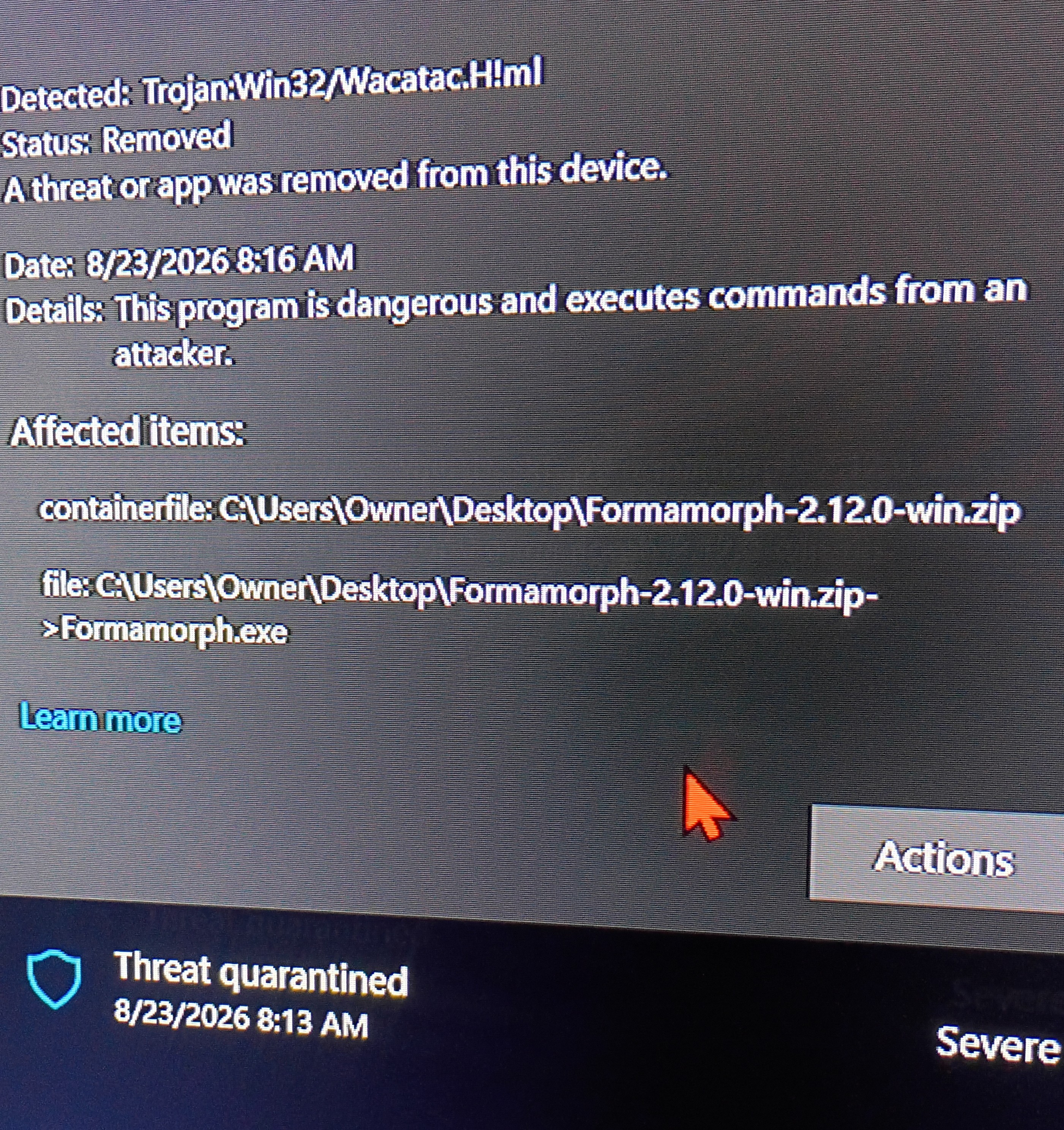
Ever since 2.12.0 version I keep getting viruses on my computer that crash it hard. I am running Windows 10 with geek squad anti-virus program.

Developer

hard crash Formamorph or hard crash your PC? And what kind of virus? 

(2 edits)

My PC shuts off before I can read virus error code but it only happens when I open 2.12 Formamorph because the 1.20 runs fine. After using 2.12 or newer version my computer keeps popping up with white screen in file explorer window in Formamorph folder, then for a brief second I get the blue screen with the virus risk screen and PC force shuts down for restart, and apon reopening home screen I get the picture above stating the program was removed due to virus. I have tried to redownload and reinstall but it keeps happening.

Developer

I'm going to push an update later today to try and get rid of the false positive for anti-virus software. you'll have to manually download it though, auto-updating won't include the fix. it'll be v.2.14.1 or v2.15.0, haven't decided yet.

As for the crashes, maybe they go away after your anti-virus stops complaining? Idk, but if they still happen after I push the update I don't think it's anything on my end.

Developer

Update is out

I downloaded and ran the link from your message, now the game opens on my PC without setting of the anti-virus or crashing. 🥰 Thank you.

I've been trying to use placeholders to get some randomized text for entities' descriptions (like names and such), but even if I set the placeholders to unique, it rolls the same thing for every entity.

I've tried a bunch of things and it looks like it works properly if the entities are present on the first turn (I get unique values for each one then), but if they show up later in the game, then they all end up the same.

Developer

I looked at the code and this isn’t the case from what I can tell. My best guess is that either the RNG gave you the same values a few times or you copy and pasted the chips or entities with placeholders which would directly copy the placeholder IDs 1:1. I will push an update to not directly copy the IDs as that is an oversight, but you’ll need to confirm the above to let me know what specifically you did to reproduce the issue.

Looks like that's it: if I duplicate an entity then the chips resolve to the same values. If I create a new one from scratch I get different values.

I tested this by making a new world with a placeholder for color (with 20 values to avoid randomly getting the same one) and 6 entities with the same description. The A are duplicates, the B are not. This is what I see in the context:

- **A1** - **description:** A man wearing a red shirt 

- **A2** - **description:** A man wearing a red shirt 

- **A3** - **description:** A man wearing a red shirt 

- **B1** - **description:** A man wearing a azure shirt 

- **B2** - **description:** A man wearing a turquoise shirt 

- **B3** - **description:** A man wearing a violet shirt

Developer (1 edit)

if that’s the case, it will be fixed in the next version. you’ll have to replace the placeholders in order for it to work though unfortunately. you can actually do that right now and it’ll work obviously, but in the future when you duplicate it won’t break like this.

I downloaded the impish llama 48 model but the engine fails to load it. it gives the error, Engine: error: Failed to create context

Engine device: Vulkan — NVIDIA GeForce RTX 2050, AMD Radeon(TM) Graphics (Chosen) · 18.3 / 19.7 GB free at load.

 is it too overloaded? apologies if this isnt a bug...

Viewing posts 146 to 165 of 165 · Previous page · First page