
On Sale: GamesAssetsToolsTabletopComics
Indie game storeFree gamesFun gamesHorror games
Game developmentAssetsComics
SalesBundles
Jobs
TagsGame Engines

Tales From the Herd: Milestone Build 2

Exclusive early release of the game's milestone builds; for patrons like you. Thank you! · By Zv'n

Bug Reports Sticky

A topic by Zv'n created Apr 04, 2025 Views: 84 Replies: 9
Viewing posts 1 to 6
Developer (1 edit)

Notice: before posting, check out the public bug tracker to see if your issue has already been logged at https://trello.com/b/rREn7nCo/tales-from-the-herd-bug-tracker

If it's not on the tracker, post about anything broken, glitched, or otherwise nonfunctional in the game. Try to be specific when describing your issue, and what sort of hardware you're on. I'll try my best to find these bugs and fix them for everyone. Thank you!
(+1)

This might be an issue on my end, but it doesn't look like the game supports alternative keyboard layouts in its visuals. It's not a huge deal, but something to do eventually. For example, I use the Dvorak keyboard layout, where my if I press the key that has the letter “F” on it, I get out the letter “U”. This is not a problem in the controls – there is no issue moving the character or anything when switching between QWERTY and Dvorak Keyboard layouts, all the controls work fine. However, the visual indicators (and the key mapping in settings) do not line up with my keyboard layout, they align with the actual keys on my keyboard. For example, the “F” key to interact still displays an “F” in both the settings and in-game, but if I were to type the “F” key anywhere else, I would get the letter “U”. This makes it confusing because I would want the indicator to have the letter “U” on it, as in my mind the “F” key is the “U” key.

This is definitely not an issue I would put at the forefront, as I doubt many play with alternative keyboard layouts, but it sounds somewhat simple to fix (though I know nothing about game development) because you already have key re-mapping implemented. This could also affect people who use other language keyboards, like Korean or Arabic or something. It makes it confusing when the game tells me to press the letter “F” but I actually have to type the letter “U” (by pressing the “F” key).

If this is a problem on my end, and when you switch to the Dvorak keyboard layout all the “F” labels switch to “U” labels in-game, let me know. I'm using Windows 11 on a laptop, and I do have programs installed that could be affecting this.

Developer

Thank you Caleb. To be completely honest, I have never used an alternative keyboard layout before, and so hadn't considered an issue like this arising. I've added it as a feature request to the bug tracker.

(+1)

I could not reproduce it, but between closing the map and starting to sprint at some point the animation for sprinting did not start, so I just scooted around on my butt. Not very serious, kind of silly, but might be worth mentioning! I also somehow ended up with water particles that would not go away no matter what I did.

Developer

Noted; I've fixed the issue with the water particles that won't go away, and will soon be investigating the butt scoot anomaly. Thanks!

(+1)

Entered the game to check on it again. I had opened the map, then opened the menu and when I closed the menu I could no longer move, I could see the symbol of where I am located on the map though, even when it was closed. I couldn't do anything and re-opened the game.

Developer

Hey Tarry – I was taking some time to spam the menu and map open and close recently, and could not recreate this particular bug. It's on the bug tracker, but I won't be able to fix it until I can consistently trigger it. Is that the exact input sequence you used? Open map (not in draw mode) > open pause menu > close pause menu? Thanks.

(1 edit) (+1)

I completed the first day and got my (legally distinct) Derpy clothes, I'm a happy man. Here's a couple of small details I noticed

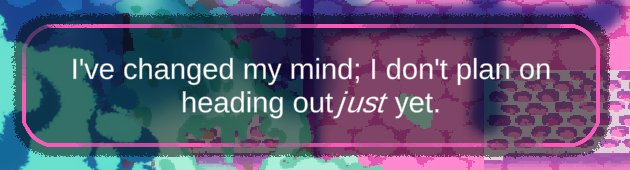
-There's a small spelling mistake, on the response "I've changed my mind, I don't plan on heading outjust yet" to the ticket master. There's a space missing between "out" and "just"

-When pausing while drawing, the mouse becomes invisible in the pause menu

-I honestly wasn't paying much attention, but I think. I was unable to write on the map after I unlocked the ability to, that is until I paused and opened the settings menu, though, I don't know if it that was the thing that fixed it

Edit: Also, can't seem to jump when walking up, I don't know if it's intentional

Developer(+1)

Lol I'm glad you're enjoying the outfits! I've been digging around on these bugs, and have a few questions if you don't mind.

- First, the dialogue error. Does it look like this in game for you?

I ask because there is technically a space there, the 'j' just seems to be extending over into the 't's territory because of the italics. If the 'j' is even closer for you, it may actually be a larger issue, because there is definitely a space in Ticket Master's script.

- Second issue I was going to tell you I couldn't recreate, but this seems to be one of those annoying bugs that doesn't show up in Unity, but does show up in the final build. I will look into it.

- Third issue I think has been fixed, assuming this was because you had your map open when Violet Spade actually gave you your pencils.

- And finally, not being able to jump while moving up is definitely not intentional behavior, and I haven't been able to recreate it. I would suggest try rebinding your "up" move key to a key you know works with jumping – e.g., if you can jump while moving down (pressing S) put the "up" input to S, then try jumping while moving up. If it works then, it may be a weird keyboard quirk. I only say this because one of the keyboards I tested did have an issue with not letting me slide when pressing 'W' and 'D' simultaneously. 

(1 edit) (+1)

-Dialogue error: Yeah that's it, apologies, it did look to me as if it was missing a space at first glance

-Second issue: Yeah, it's not a big deal, but it was something I noticed

-Third issue: I think that's what happened, thankfully you were able to recreate it without much detail on my part

-Not being able to jump while moving up: My bad on this one, I should've specified, it happens when you sprint; you can't jump when sprinting and moving upwards. But I did rebind the keys, and it looks like whatever movement key "W" is set as, will not be able to jump while sprinting