Indie game storeFree gamesFun gamesHorror games
Game developmentAssetsComics
SalesBundles
Jobs
TagsGame Engines

Missing things in the tutorial already: 1. not only mention you can have 5 members in your party but encourage to get them. 2. i entered with only 1 and got killed by the toxic gass. There was no warning, no explaining about it, and i couldn't figure out how to get out again, so i died. 3. A means to restart the tutorial, because i didn't finish it in the first place, and there was no tut to help me.


Maybe because i lost the tut on my first death, but even when i entered the dungeon, i got killed by a monster because no original weapon (on all 5 party members) seemed to do enough dmg to the beast. :-(

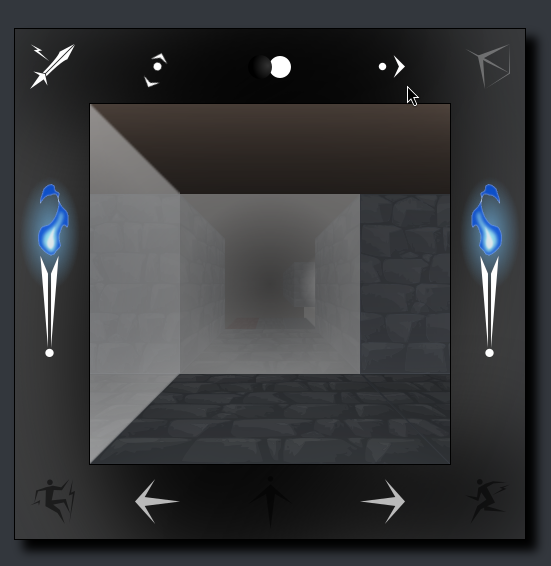
Oh, the drop down menu is wayyyyy too fast disappearing again; i couldn't even read all the options before it was gone.


And somehow you can end up on a grey backgrounded starting page with no options to restart or end, or... whatever.

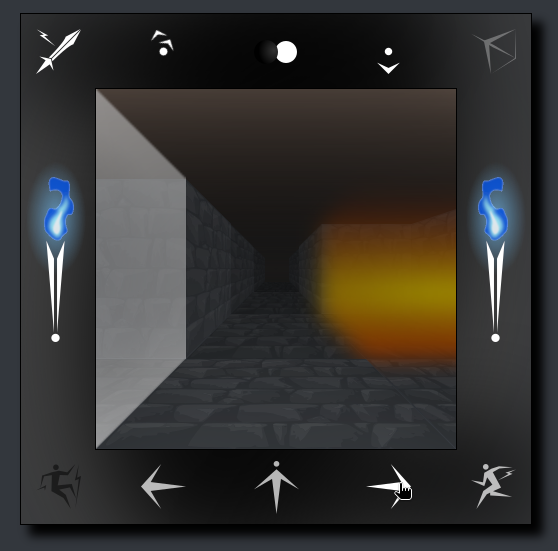
These are good suggestions -- thank you for taking a shot at it. Will work on addressing these. I am unsure what the toxic gas is you encountered. There is no toxic gas in the game -- perhaps you went left out of the inn, around into the misty area and had your torch blown out by a gust of wind and everything went dark? I will see if I can reproduce something. Appreciate it!

the orange glow, i entered it and "you suffocated..." (or something like that)


Nula'uf I'oy is choking to death and burning alive!

Nulyg Uvulkstil is choking to death and burning alive!

Fibamul is choking to death and burning alive!

Ybrimu is choking to death and burning alive!

Crowi is choking to death and burning alive!

Nula'uf I'oy is choking on smoke and burning alive!

Nulyg Uvulkstil is choking to death and burning alive!

Fibamul is choking to death and burning alive!

Ybrimu is choking to death and burning alive!

Crowi is choking to death and burning alive!

  • Crowi

    Level 1 slinger

  • Ybrimu

    Level 1 survivalist

  • Fibamul

    Level 1 soldier

  • Nulyg Uvulkstil

    Level 1 slinger

  • Nula'uf I'oy

    Level 1 survivalist

i had to do a really quick copy/paste here (text removing really fast too!), and remove a lot of unwanted parts before posting (even the images of my heroes and some maze stones were showing?), hence the 3 empty blocks on top ;-)

you would think that going left (or right) twice will give you the wy out again, but it doesn't... is it meant to learn a skill later on to deal with this?


Same goes for  "falling in water"... no way out, so you simply drown (and have to refresh the game page to be able to start the game again (not refreshing makes you end up on the grey, empty page).

(2 edits)

If you fall into water you can climb out using the  climb icon: 

... if you click the left or right arrow twice you will be turned around 180 degrees from the direction you were looking before. So if you drop down a level, you can click right-right (or left-left) and then the climb button to climb back out in the direction you fell from -- unless you fall down more than one level in which case you may or may not be able to climb back up that way. The game design is definitely inspired by 80s games like Wizardy, Ultima III, and Bard's Tale.

Ah -- the fire. Yes, I could see how that is confusing. I am working on the gray empty page problem. You can get back to the gallery from the menu -- which now has a much longer time before it auto-closes. But currently when you exit the maze the gallery is closed and must be opened from the menu to start over. I will likely make the gallery persistently open. I may also add an extra item for newly created characters. You can buy more weapons / armor directly across from the inn and to the left after you exit from the green door. Thanks again for all the feedback.

Ok, have made the Rogues Gallery persist -- it cannot be closed now -- so you should not see the grey background you were encountering before, you should always see the gallery when you exit the maze or if your party gets wiped out.

Also missing: which direction is North? lol

Quest mentioned i should go the the northern shadowed section, but i don't know which direction is pointing North, which South/West/East. Maybe you can add an N to show you're facing north, and when turning clockwise that N turns into E, S, W, and back into N?

Another good suggestion -- the compass in the main nav doesn't have letters currently. Up is north, down south, left west, east right.

Huh? That doesn't make sense to me: if i click on the right arrow, my view turns right too and  "up" goes in that direction then... which to me should now be East (because i only turned right once, from facing North). But, after a few turns, i completely lose track on how many right turns and how many left ones i took.

This could be a case of me being too close to this. So if you take a couple of steps forward after you enter the maze you get to the corner below:

The compass doesn't change for those steps -- it stays pointed right, indicating you are facing east. Then if you click the right arrow, you turn and now are facing South, below:


Now you are facing south and can move forward along the open corridor. The compass at the top is pointing down, indicating you are facing South. I don't know if this helps at all. I really wanted to avoid using text characters in the nav frame to keep things more symbolic and align the style of the clock with the compass (and vice versa). But if it's confusing I will for sure need to rethink. Thanks for spending so much time providing feedback. My users to date have all been friends and family and I have low confidence they gave me 100% honest feedback :)

(1 edit)

Ahhh, i didn't know that was already in the game (maybe it's in the tut i lost too early?). Or, if it's not in the tut, maybe you can add it so it'll be clear for everyone else? Either way, this is for sure enough, so no extra N/E/S/W is needed. ;-)

 Also, i was thinking the directional arrows at the bottom were meant by you, lol.