
On Sale: GamesAssetsToolsTabletopComics
Indie game storeFree gamesFun gamesHorror games
Game developmentAssetsComics
SalesBundles
Jobs
TagsGame Engines

Flipzag: free one-tap gravity runner in the browser. Is the first minute clear?

A topic by Axeri Labs Games created 4 days ago Views: 103 Replies: 5
Viewing posts 1 to 6

Hey, I made a little one-button game and so far pretty much only my family has played it.  I have no idee what a stranger makes of it.

https://axerilabsgames.itch.io/flip-run-prototype (runs in the browser)

You're a block that runs by itself. Tap, click or hit SPACE to flip gravity and switch between the floor and the ceiling. When you die you just go again, there are no lives and no game over. There are 50 levels, plus an endless mode, a daily track and a 2 player mode if you've got someone next to you.

What I'm mostly wondering:

  • Did you get what to do right away?
  • Where did you quit, and why?
  • Did anything feel unfair or broken? especially on a phone
  • Is the music or sound annoying?

Be as harsh as you like, it helps more than "nice game".

Full disclosure: I used AI to write the code, and the art, music and sound are all generated by that code.
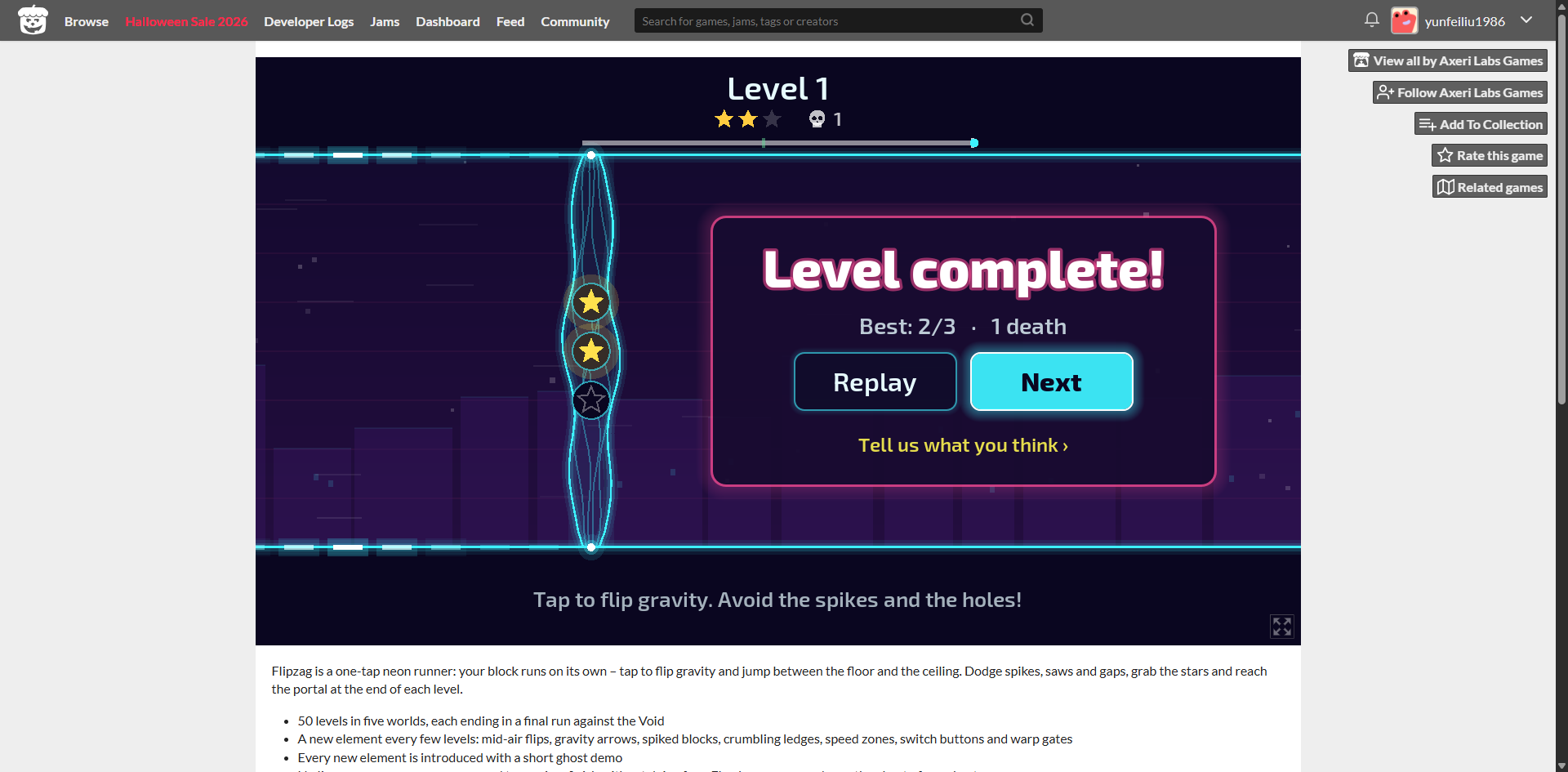
At first, I didn’t know that I could press the spacebar to jump.

I stopped at the point shown in the screenshot because I couldn’t figure out how to get past the vertical obstacle.

I didn’t encounter anything that felt unfair or broken. The music and sound effects were okay, but they didn’t stand out to me.

Thanks for playing, this is really useful! You're right about the spacebar, the hint only says "tap".

About the vertical obstacle: in your screenshot, that glowing shape is the finish gate, and the "Level complete!" panel means you had already finished level 1. So I think that's on me, because it clearly didn't read as a finish. Did you notice the Next button, and did it work when you tried it? And before the panel appeared, what did you think that shape was?

Pretty straightforward. Hypnotic. I played to like level 12 or so. I really wanted a 1-click "restart" option because I wanted to 3-star every level, so missing a star meant having to click through a menu, taking me out of the "rush", "flow" of the game. "Outrun the void" is a neat concept but didn't seem to matter unless there's some way to affect speed, like getting boosts from chaining object collections (if you had more items to grab), last-second dodges of obstacles, or something like floor tiles that cause a speed boost....all of which could be further into the game. I only went so far.

Played to around level 21 or 22? Lost track :) I agree about the "Outrun the void" concept, it's a cool idea but doesn't seem to have any effect. It would be better if there was a way to both gain and lose ground -- maybe each time you Flip you lose a *tiny* bit of momentum and have to build up your speed again, so if you flip too many times you get overtaken, and conversely maybe when you get a star -- or alternatively there might be items in the game that simply speed you up or slow you down a bit.

Great concept, simple & hypnotic, great work!

Thanks a lot, all three of you, this was exactly the kind of feedback I was hoping for. I just uploaded a new version (0.6.0) based on it:

  • Outrun the void now actually matters (urvek_x, Qwanderer): on the last level of each world (10, 20, 30...) the void really chases you. Every flip lets it a little closer, every star pushes it back, speed zones let you pull away, and the checkpoint shoves it back. If it catches you, you die.
  • One-click restart (urvek_x): there's a restart button next to pause, or just press R, so you can go for 3 stars without leaving the level.
  • The tips for new obstacles no longer pause the game. They just show up for a couple of seconds with a short slow-down.
  • yunfeiliu1986: on desktop the first hint now says "Click or press Space", and the finish gate has a FINISH label, so it shouldn't look like a wall anymore.

If you have a few minutes, I'd love to know whether the void feels fair now. You can jump straight to any level you've unlocked from the Levels screen.