Since 1.9 is adding so many new activities, I was wondering if the studio recording sessions are getting any upgrades too? It would be awesome to have more interactive options and things to do while filming instead of just the basic setup!
Hello.
If you mean livestreaming - it will get new rewards.
If you mean just photoshoots - I doubt that.
Uhhh...
Doubt that. More than that - car UI was reworked, and now looks even more cool.
There is a 1014 word development log and 16 images of Roundscape Eclipse on Patreon - https://www.patreon.com/Roundscape/posts/roundscape-134714782 - The game looks amazing, even if we are still waiting on that Whisper and Aylar post
Roundscape is the main IP for Kal and will be for the forceable future. Kal likes to work on his own, that is very evident. Starmaker wouldn't be Starmaker if he didn't. Also believe the fact, if Starmaker was the main IP, would be getting updates even less and infrequent.
All we can do is take it as it is, and hope a spin off gets selected next. If it doesn't that means the passion is gone, and it wouldn't be something we would want anyway.
I just to clarify my point on Kal working on his own: Kal works with a 2D artist (furanh) and 3D designer (limitiv) for Roundscape Eclipse.
For Starmaker the pipeline is more or less solo, with a little bit of technical input from randoms from time to time.
Hello.
Smk was initially started just to learn Unity for Roundscape Eclipse, but turned out pretty good.
About development process - that's only on Kal's side to decide, where to spend resources, and how many.
Recently he said or joked, that if steam revenue of smk will be good - he'll create a separate smk team, to make better smk like games.
Wouldn't that just end up in all the same mistakes made with Arenus 🤔 I think part of what makes Starmaker what it is, is the fact it is created by one single mind...
I think he was joking.
But we can get a new staff member - MrModMan, if revenue of smk on steam will be good.
This guy made ModForge, Gallery mod and Androids mod
Still think money would be better invested in acquiring a really long stick to poke him with when every time he gets distracted by working on one project when he should be working on another...
But hey, good news for you - that new version of Adorevia is ready.
I'll be one of several people, to playtest it
Would be a nice treat after I finish this gapping animation of Sam I have been working on for too long...
Anna’s tablet will arrive soon, bringing even more depth to the cast.
😭Oh 1.7 release notes, how you lied to me...
Hello.
There were plans to expand this part on Adrian's and Joseph's PCs.
About Anna's tablet - IIRC this idea was scrapped. But who knows, what can 1.9 bring us.
Hello there,
as you can see on the teasers on the main post she is one of the girls that participates in the new beach minigame, she will have new content but that's as much as we are showing for her until release.
How long until version 1.9 is released?
Could you create a dedicated thread just for the latest updates—separate from the general development discussion—so I can easily spot anything new? On itch.io, I have to scroll through all the old posts, and I can’t tell when the developer has shared something new.
Hello.
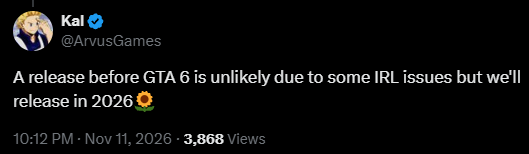
1.9 will be released in 2026.
A lot of sneak peeks you can see at the first page of this forum.
I also share some of them
Hey! I can drop a somewhat clean setup guide for you right here. I use ComfyUI Desktop, and on my setup (RTX 4090) it takes like 2-3 seconds to generate an image. Just keep in mind you'll need a decent GPU with at least 8GB to 12GB of VRAM for this to run smoothly.
I'm kinda new to this so others might have better alternatives, but at least this is working extremely well for me.
1. Where to get the files
Go to civitai.red (make sure it’s the .red domain because that's the one that allows NSFW). Search for starmaker story and click on the Starmaker Story Style - Anima page.
You will see a showcase image with Himari. Click on that image (or any other image you like there) and look at the right side of the screen. It will show you the exact Prompt, settings (Steps, Sampler, etc.), and the resources used to make it.
2. Downloading & placing the files in ComfyUI
You need to download the resources listed there and put them in the right folders:
3. Setting up the Workflow
Instead of wasting hours trying to learn how ComfyUI nodes work from scratch, do this:
A) Take whichever photo you like from Civitai, drag and drop it straight into Comfy Desktop and boom, it will load the workflow for you. Warning: people's workflows can be a huge mess and ask you to install a bunch of extensions. So I recommend doing B instead:
B) Ask an AI to make a simple (but really effective) workflow for you, or just use mine! I'll reply to this comment with my JSON code below. Just make a new .txt file with notepad, paste the code inside, change the file extension from .txt to .json, and drag and drop that .json file into Comfy Desktop. (Just make sure to click the nodes and select the files you downloaded).
{
"last_node_id": 11,
"last_link_id": 13,
"nodes": [
{
"id": 1,
"type": "UNETLoader",
"pos": [40, 80],
"size": [320, 90],
"color": "#322",
"bgcolor": "#533",
"title": "Image Model (WaiAnima)",
"outputs": [{"name": "MODEL", "type": "MODEL", "links": [1], "slot_index": 0}],
"widgets_values": ["waiANIMA_v10Base10.safetensors", "default"]
},
{
"id": 2,
"type": "CLIPLoader",
"pos": [40, 210],
"size": [320, 90],
"color": "#332",
"bgcolor": "#553",
"title": "Text Encoder",
"outputs": [{"name": "CLIP", "type": "CLIP", "links": [2], "slot_index": 0}],
"widgets_values": ["waiANIMA_v10Base10_txt.safetensors", "longcat_image", "default"]
},
{
"id": 3,
"type": "VAELoader",
"pos": [40, 340],
"size": [320, 90],
"color": "#323",
"bgcolor": "#535",
"title": "Image VAE",
"outputs": [{"name": "VAE", "type": "VAE", "links": [12], "slot_index": 0}],
"widgets_values": ["qwenImage_qwenImageVAE.safetensors"]
},
{
"id": 4,
"type": "LoraLoader",
"pos": [400, 80],
"size": [320, 130],
"color": "#432",
"bgcolor": "#653",
"title": "LoRA 1 (Turbo)",
"inputs": [
{"name": "model", "type": "MODEL", "link": 1},
{"name": "clip", "type": "CLIP", "link": 2}
],
"outputs": [
{"name": "MODEL", "type": "MODEL", "links": [3], "slot_index": 0},
{"name": "CLIP", "type": "CLIP", "links": [4], "slot_index": 1}
],
"widgets_values": ["anima-turbo-lora-v0.2.safetensors", 0.9, 1.0]
},
{
"id": 5,
"type": "LoraLoader",
"pos": [400, 250],
"size": [320, 130],
"color": "#432",
"bgcolor": "#653",
"title": "LoRA 2 (StarMaker Style)",
"inputs": [
{"name": "model", "type": "MODEL", "link": 3},
{"name": "clip", "type": "CLIP", "link": 4}
],
"outputs": [
{"name": "MODEL", "type": "MODEL", "links": [5], "slot_index": 0},
{"name": "CLIP", "type": "CLIP", "links": [6, 7], "slot_index": 1}
],
"widgets_values": ["starmaker.safetensors", 1.0, 1.0]
},
{
"id": 6,
"type": "CLIPTextEncode",
"pos": [760, 80],
"size": [400, 150],
"color": "#242",
"bgcolor": "#363",
"title": "Positive Prompt",
"inputs": [{"name": "clip", "type": "CLIP", "link": 6}],
"outputs": [{"name": "CONDITIONING", "type": "CONDITIONING", "links": [8], "slot_index": 0}],
"widgets_values": ["@starmaker, "]
},
{
"id": 7,
"type": "CLIPTextEncode",
"pos": [760, 270],
"size": [400, 150],
"color": "#422",
"bgcolor": "#633",
"title": "Negative Prompt",
"inputs": [{"name": "clip", "type": "CLIP", "link": 7}],
"outputs": [{"name": "CONDITIONING", "type": "CONDITIONING", "links": [9], "slot_index": 0}],
"widgets_values": ["worst quality, low quality, score_1, score_2, score_3, blurry, jpeg artifacts, sepia, low quality, blurry, overexposed, modern anime, 3d render, realistic, plastic skin, overly shiny, photorealistic, nsfw details overload, deformed, bad anatomy"]
},
{
"id": 8,
"type": "EmptyLatentImage",
"pos": [760, 460],
"size": [320, 110],
"color": "#234",
"bgcolor": "#356",
"title": "Resolution",
"outputs": [{"name": "LATENT", "type": "LATENT", "links": [10], "slot_index": 0}],
"widgets_values": [832, 1216, 1]
},
{
"id": 9,
"type": "KSampler",
"pos": [1200, 80],
"size": [320, 300],
"color": "#234",
"bgcolor": "#356",
"title": "KSampler (Turbo)",
"inputs": [
{"name": "model", "type": "MODEL", "link": 5},
{"name": "positive", "type": "CONDITIONING", "link": 8},
{"name": "negative", "type": "CONDITIONING", "link": 9},
{"name": "latent_image", "type": "LATENT", "link": 10}
],
"outputs": [{"name": "LATENT", "type": "LATENT", "links": [11], "slot_index": 0}],
"widgets_values": [0, "randomize", 12, 1.0, "euler", "simple", 1.0]
},
{
"id": 10,
"type": "VAEDecode",
"pos": [1560, 80],
"size": [210, 90],
"color": "#323",
"bgcolor": "#535",
"title": "VAE Decode",
"inputs": [
{"name": "samples", "type": "LATENT", "link": 11},
{"name": "vae", "type": "VAE", "link": 12}
],
"outputs": [{"name": "IMAGE", "type": "IMAGE", "links": [13], "slot_index": 0}],
"widgets_values": []
},
{
"id": 11,
"type": "SaveImage",
"pos": [1810, 80],
"size": [350, 420],
"color": "#233",
"bgcolor": "#355",
"title": "Save Output",
"inputs": [{"name": "images", "type": "IMAGE", "link": 13}],
"widgets_values": ["Starmaker_Output"]
}
],
"links": [
[1, 1, 0, 4, 0, "MODEL"],
[2, 2, 0, 4, 1, "CLIP"],
[3, 4, 0, 5, 0, "MODEL"],
[4, 4, 1, 5, 1, "CLIP"],
[5, 5, 0, 9, 0, "MODEL"],
[6, 5, 1, 6, 0, "CLIP"],
[7, 5, 1, 7, 0, "CLIP"],
[8, 6, 0, 9, 1, "CONDITIONING"],
[9, 7, 0, 9, 2, "CONDITIONING"],
[10, 8, 0, 9, 3, "LATENT"],
[11, 9, 0, 10, 0, "LATENT"],
[12, 3, 0, 10, 1, "VAE"],
[13, 10, 0, 11, 0, "IMAGE"]
],
"groups": [],
"config": {},
"extra": {"ds": {"scale": 0.9, "offset": [20, 20]}},
"version": 0.4
}
Just wanna say, thanks a bunch providing us tutorial I really don't know how to navigate ComfyUI. Just a quick question though, how do I like connect a PromptManager to the Positive Prompt? I wanna input what I want to say to the PromptManager and it would transfer to the positive prompt. Any suggestions? Thanks in advance!
You're very welcome! To be honest, I'm pretty new to this whole thing too. I keep my setup super simple so far and just type my prompts directly inside the green Positive Prompt box (clip text encode). As you can see in the screenshot, I just connect its output straight into the positive input (the little dot/slot) on the KSampler, and the red Negative Prompt box (also a clip text encode) goes into the negative input on the KSampler.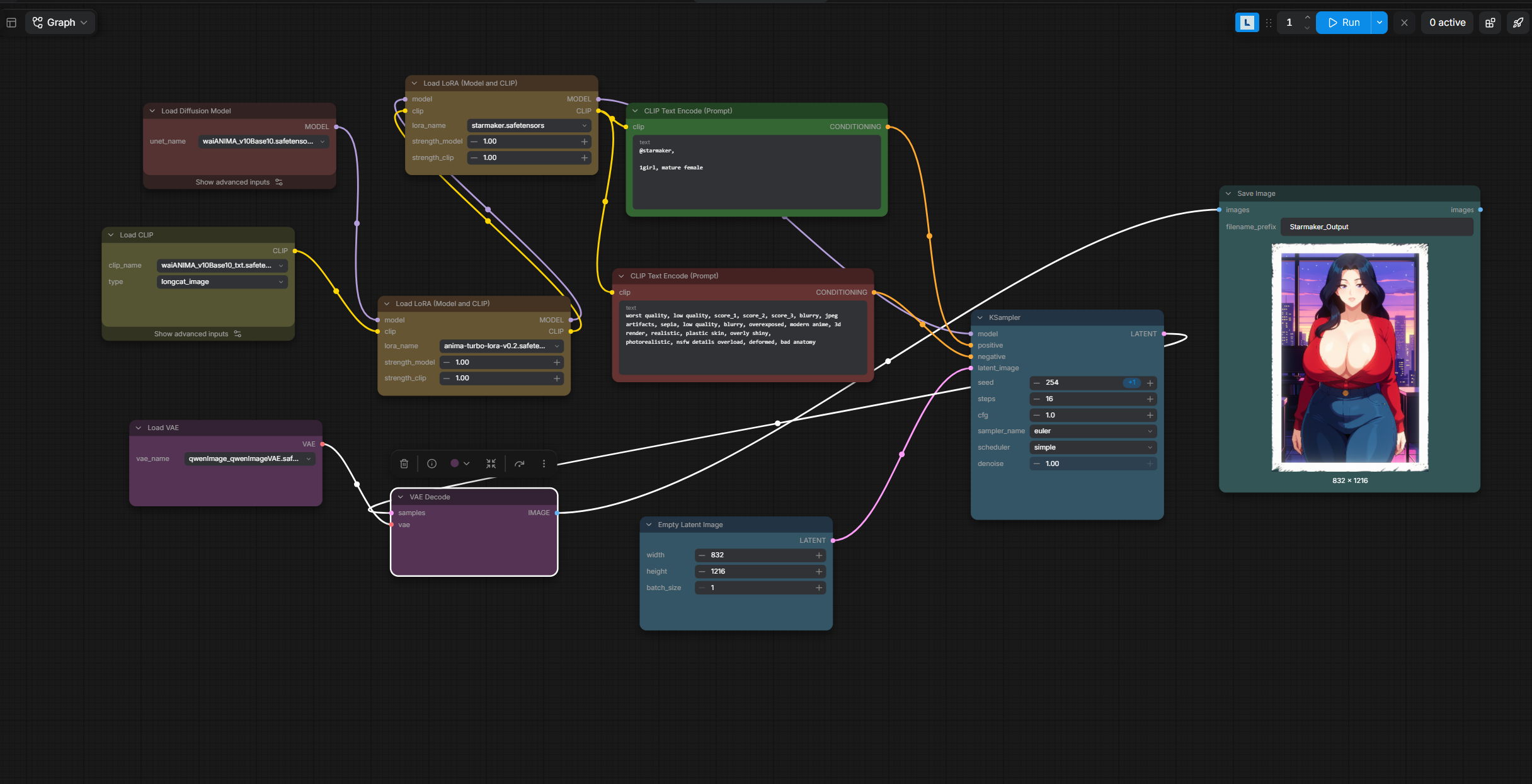
It's still there, they haven't removed it! Just make sure you are going to civitai.red and not civitai.com (because the .com hides NSFW stuff). Your normal .com account works the exact same on .red.
Here is the link too (in case itch.io or the mods allow it): https://civitai.red/models/2699251/starmaker-story-style-anima
To get a specific art style, a specific character, or basically anything specific, you need LoRAs.
The setup I shared only has the art style LoRA , so it doesn't include specific characters (Though it naturally generates Anna most of the time, which is all I really want, so that's why I don't use other LoRAs!). If you want specific characters, you have to download character LoRAs for them. For example, one LoRA for Amelia: https://civitai.red/models/3040258/amelia-starmaker-story?modelVersionId=3455597
Just like in the guide above, put those files in:
Comfy-Desktop\ComfyUI-Shared\models\loras
(Then you just load them into a LoRA node in the workflow, like the ones I already have set up there).
There might be an all in one LoRA out there that has all the characters from the game instead of having to download them one by one, though I haven't found anything like that yet!
Hello.
Yes, we all hate to wait. But as sensible adults, we do this.
Don't worry, release is soon.
P.S. nice PFP
the pirate token isn't promoting privacy it's a token in fortnite that gives u free stuff it's 100% legal
Steam release was never advised to be in November, as for the 1.9 update please check the latest posts by Kal. He had some family matters to take care of and thus the "before GTA 6" will not be possible, he is still trying to get it done for November but is best to expect it before end of the year instead.
1.9 releases on November 27th but I decided to reset the world back to January resetting everyone's memory but the fans.
Hello.
Please, don't provide misinformation about release date.
Smk 1.9 will release in 2026. That's the only date we'll have.
There is no delay in Ba Sing Se.
The devs have assured us that the game is still coming out on the original release date. There has never been a delay. There will never be a delay.
The release date is perfectly safe.
Kal and Dr. Muramasa invites you to Lake Laogai.
Hello there,
it was explained some time ago, Kal has some family matters that require attention and thus the date is 2026. He is trying to also get it done by the end of November, but the safe bet is before end of the year.