

On Sale: GamesAssetsToolsTabletopComics
Indie game storeFree gamesFun gamesHorror games
Game developmentAssetsComics
SalesBundles
Jobs
TagsGame Engines
(1 edit) (+6)

Get the inside story with

The Interior Contraption:


The Interior contraption is a draggable object which reveals part of the background image from another card based on a "mask". Any part of the mask image that contains cyan pixels will be replaced as the contraption is moved around. If you specify the name of more than one card (in a comma-separated list), they will be cycled as an animation. A quick demo of setting this contraption up:


%%WGT0{"w":[{"name":"interior1","type":"contraption","size":[94,97],"pos":[282,140],"show":"transparent","def":"interior","widgets":{"c":{"size":[94,97]},"i":{"size":[100,28],"pos":[149,-5]},"n":{"size":[100,31],"pos":[149,46]}}}],"d":{"interior":{"name":"interior","size":[63,63],"resizable":1,"margin":[5,5,5,5],"description":"display an \"interior\" within the cyan pixels of a mask image composited in from another card.","script":"on get_mask do i.value end\non get_card do n.text  end\non set_mask x do i.value:x end\non set_card x do n.text:x  end\n\non view do\n mask:first extract arg where arg..type=\"image\" from i.value\n card.size:c.size:mask.size\n cn:\",\" split n.text\n cb:deck.cards[cn[(count cn)%floor sys.frame/10]].image\n if cb.type~\"image\"\n  cb:cb.copy[card.pos card.size].map[0 dict 32]\n  c.clear[]\n  c.paste[mask.copy[].map[(colors.cyan dict 1) 0]]\n  c.merge[mask.copy[] cb]\n end\nend\n\non drag do\n card.pos:pointer.pos-c.size/2\nend","attributes":{"name":["mask","card"],"label":["Mask","Card(s)"],"type":["rich","string"]},"widgets":{"c":{"type":"canvas","size":[63,63],"pos":[0,0],"locked":1,"animated":1,"show":"transparent","border":0,"draggable":1,"scale":1},"i":{"type":"field","size":[100,20],"pos":[118,-5],"locked":1,"show":"none","value":{"text":["","i"],"font":["",""],"arg":["","%%IMG2AD8APwFAJz0BAic9AQInPQECJz0BAic9AQInPQECJz0BAic9AQInPQECJz0BAic9AQInPQECJz0BAic9AQInPQECJz0BAic9AQInPQECJz0BAic9AQInPQECJz0BAic9AQInPQECJz0BAic9AQInPQECJz0BAic9AQInPQECJz0BAic9AQInPQECJz0BAic9AQInPQECJz0BAic9AQInPQECJz0BAic9AQInPQECJz0BAic9AQInPQECJz0BAic9AQInPQECJz0BAic9AQInPQECJz0BAic9AQInPQECJz0BAic9AQInPQECJz0BAic9AQInPQECJz0BQA=="]}},"n":{"type":"field","size":[100,20],"pos":[118,30],"locked":1,"show":"none","style":"plain"}}}}}
(+3)

man this is SO cool !!!!!!!

(+3)

There are a lot of interesting ways this contraption- or similar compositing techniques- could be used. I'd love to see what you can come up with!

(+1)

i've been able to use this contraption to great effect in https://kinkykikker.itch.io/dead-of-night, thanks! (light 18+ warning)

weirdly it seems to break (or at least not respond to dragging) as soon as i open any of the widgets inside of the prototype, when not even editing them. i couldn't tell you why..

(+2)

Glad to hear it was useful; your deck looks really cool!

One way that prototypes can seem to "break" when you're editing them is that if you open the script of a widget that doesn't already have one, Decker will fill in a "template" script with empty event handlers. If the prototype was designed to bubble events from those widgets up to the top-level script, the templates can prevent that by "swallowing" the events early; you can try fixing the problem by deleting the template scripts on those widgets.

(+2)

aha! that was exactly right :)

thanks for looking at my deck! it's been really great to use decker, it's been accessible and very fast to work with :)

(1 edit) (+1)

Hi, I was just wondering, is there a way to use this contraption with a custom palette? I tried making a palette that included cyan, but it wouldn't let me use a custom mask shape no matter what I tried. Any tips?

Edit: I figured out a way, by editing the hex file for the default palette and leaving cyan as it was.

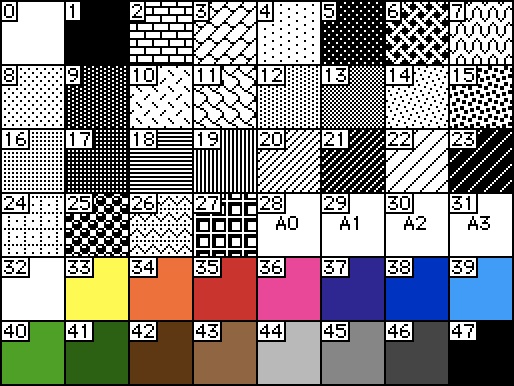
In Decker's default palette, cyan is pattern index 39. The actual visible color doesn't matter, just the pattern index:


If you want to use a different index for your mask color in a custom palette, you can replace "colors.cyan" in the script of the prototype for this contraption with a different pattern index. Does that make sense?

I think so. 🤔 So will it automatically use whatever is in the 39 slot for the mask color if I change the palette, or do I have to change the code as well to get it to work?

If you don't change the code, this contraption will use whatever color is in slot 39 as the mask color.