



Ho ok. I would love to purchase this kind of assets if there was at least few static poses to switch from (idle - dead - hit at minimum).
Do you plan on releasing this king of assets in the future ?
Coding Mojo
29
Posts
10
Topics
11
Followers
2
Following
A member registered May 24, 2019 · View creator page →
Creator of
The simple and efficient way to handle experience and leveling in your games.
A controlled random that keeps player's frustration away of all your looting systems.
Recent community posts
Raven Fantasy - 2D PixelArt Tileset and Sprites - Battler Set 2 comments · Replied to Clockwork Raven in Raven Fantasy - 2D PixelArt Tileset and Sprites - Battler Set 2 comments
Raven Fantasy - 2D PixelArt Tileset and Sprites - Battler Set 2 comments · Posted in Raven Fantasy - 2D PixelArt Tileset and Sprites - Battler Set 2 comments
FeelCraft : Instant Juice for Unity comments · Replied to DarkChibiShadow in FeelCraft : Instant Juice for Unity comments
FeelCraft : Instant Juice for Unity comments · Replied to DarkChibiShadow in FeelCraft : Instant Juice for Unity comments
I never thought balancing a scoring system could be this difficult.
In my complete innoncence, I figured giving one point per brick would be more than enough. After all, every part of the level would be worth the same amount of points. It's also incredibly simple to implement. From there, it's up to you to launch your balls well and squeeze out as many points as possible...
I was so wrong...
Idle games don't have that many player actions to begin with, so if your score only goes up one point at a time, it quickly becomes boring. Even worse, because my game is competitive, it's almost impossible to come back once you're behind. You can tell who's going to win way too early. No comeback. No suspense. You just clench your butt and wait for the match to end.
Clearly, that wasn't working.
To make things more exciting and keep the outcome less predictable, I started looking for a way to give bricks a wider range of point values. I wanted to keep the system simple and make it fit naturally with the game's pixel art aesthetic, so now each brick is worth points based on its color.
Colors are stored as four RGBA channels ranging from 0 to 255. The score is simply the sum of the first three channels.
White = 255 + 255 + 255 = 765 Black = 0 + 0 + 0 = 0
I made one exception for black so it's still worth 1 point. Ideally though, I just wouldn't use pure black in my levels. That means every brick is worth somewhere between 1 and 765 points.
The result feels so much better, both visually and emotionally. But the comeback problem isn't completely solved yet. Around halfway through a match, one player still tends to pull ahead. I'm hoping that adding random power-ups next will help keep games unpredictable until the very end.
Another issue with the previous version came from the level design itself. Pixel art makes for beautiful levels, but it also creates very few tunnels where balls can get trapped and bounce around in long chains. Personally, that's one of the most satisfying things to watch in a Breakout game.
So I added a power meter that fills up as your ball destroys bricks. Once it's full, it activates a temporary ability that lets the ball pass straight through bricks. This naturally creates new tunnels, kicks the action back into high gear, and adds another layer of unpredictability since your opponent can take advantage of those tunnels too!
Now I'm still debating one thing: should this power activate automatically, or should players decide when to use it?
What do you think?
itch.io Community » Game Development » General Development · Created a new topic On Making Games After Work
I want to make games, but I never seem to have enough time.
Long days at work, commuting, family, rest... Trying to make games on top of everyday life quickly starts to feel like working two full-time jobs.
You could tell me I should spend my free time doing something else. Something less time-consuming. And you'd be right. I tried. But there's something about this particular creative outlet, this art form that constantly pushes me beyond my own limits, that feels like a genuine need. Without it, something is missing.
You know me, though. I'm not the kind of person who gives up easily. So I went looking for a solution. I won't lie, it took me years of trial and error... but I sincerely hope that by sharing what I've learned, I can save you those years.
When you're younger, the obvious solution is brute force: much coffee, much sugar, cutting into your sleep, trying to squeeze two days into one. And yes, it worked... for a while. But at what cost ? I was so focused on moving forward that I didn't realize I was heading straight for a wall. Our body and our mind are our most valuable assets. They're incredibly hard to repair. Impossible to replace. Sacrificing your health and your quality of life, only to have burnout wipe out every extra hour you "saved" with months of recovery simply isn't worth it.
So I tried another approach. I'd take my time. I'd make steady progress. A few dedicated hours every week. Looking back, those years just built up a graveyard of unfinished projects. That's because every new project starts the same way: you're excited, your motivation is at its peak. But when you only have a few hours each week, progress comes painfully slowly. Results take forever to appear. Satisfaction fades, frustration takes over, and before you know it, you're jumping from one exciting new project to the next, never actually finishing anything.
So if working more doesn't work... and working at your own pace doesn't either... what's left?
Working at your own pace… but differently !
I realized I wasn't really lacking time. I was lacking small victories.
Motivation needs to be fed. When I only have one hour to work, spending it building a system, no matter how deep or important it is, can leave me feeling like I didn't accomplish much if that work remains “invisible”. On the other hand, adding even a simple feature that suddenly comes alive in the game... that feels incredibly rewarding to me !
You might say, "Sure... but adding game feel is a lot of work too."
That's exactly the problem I ran into when I tried this approach. So I put my personal projects on hold for a while and built a tool specifically to make that step fast and effortless. What used to take hours now takes me just a few minutes. For the first time, I'm able to keep my motivation alive. I'm genuinely excited to start each work session. I can't wait to open Unity and watch my project come to life, even if I only managed to spend a handful of hours on it that week.
Kiss-Cool effect ? My prototypes already look polished enough to share with my community or on social media from the very first versions.
Did you found your own tricks for staying motivated ? I'd love to hear them. :)
itch.io Community » Game Development » General Development · Replied to Eldwood in I stopped treating game feel as Polish, and it changed everything
itch.io Community » Game Development » General Development · Replied to Noob’s Games in I stopped treating game feel as Polish, and it changed everything
itch.io Community » Game Development » General Development · Created a new topic I stopped treating game feel as Polish, and it changed everything
I've always loved the polish phase of game development.
Adding game feel can completely transform a game. After weeks (or even months) spent building gameplay systems, it's often the moment where everything finally starts feeling alive. The downside : probably the most time-consuming parts of development, at a stage I’m already exhausted… Jumping through your codebase, writing countless one-off animation scripts, camera effects, and little feedback systems. OMG…
And to achieve the picture, have you ever, like me, spent hours adding juice to a game after weeks of coding, only to discover that... it just still s**k ?
No way I could continue this way, so I changed my workflow. Instead of treating game feel as the final polish pass, I started adding it during the prototyping phase. But as juicing up requires so much effort, I ended up building a small animation tool for myself that lets me iterate extremely quickly.
The result ? I can discard weak prototypes much earlier. I can focus on the mechanics that actually have potential. AND, I finally stay motivated throughout development because the game already feels satisfying from the very beginning.
Looking back, it's probably had a bigger impact on my development process than almost any other tool I've made so far.
How do you approach this phase and how do you manage to keep motivated on the long run ?
My Idle Breakout game welcomes a second player !
Yeah, I thought it would be fun to have a versus mode. So here it is, a second player support (local).
But there is more :
1 : Power Bars
Brick destroyed now fills a power bar, once the bar is full, player can consume it to trigger it's ball special ability. For now, abilities are not integrated yet, but it's my next step !
2 : UI
Ui is my nightmare. I tried to avoid this step for a while, but now, it's time to start. BUT, thanks to this awesome youtube tutorial , it turned to be pretty simple to get started. So, because I like to work the game feel as the game goes, I had to make a few update to my Feel Craft tool so it now supports animating some UI components. Also, as the game feel gets more intensive, I had to do a performance pass on it.
This is how it looks so far.
Thanks for reading :)
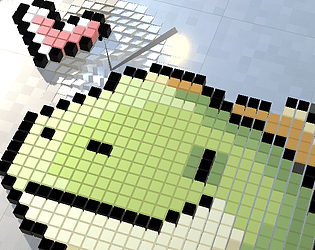
To make my life easier, I came up with the idea of creating the levels for my Idle-Breakout from pixel art images, and the craziest part is that it actually works!
It all started from a tutorial I published on my youtube channel about how to create a very basic Breakout game. At the end of the video, I encouraged viewers to customize it as a way to deepen their learning, but I received a few comments from people who simply lacked ideas to experiment with.
So I decided to lead by example.
The idea came to me pretty quickly : modernize classic arcade Breakout with a versus mode and remove the paddle to turn it into an idle game!
It was only supposed to be a small creative exercise, material for a new video. But I wanted a visually appealing level, and the way levels were created in this simplified version was incredibly tedious... A huge 2D array of integers that had to be filled manually, where each integer represented a specific color. Not only was it time-consuming to create, but it was also extremely difficult to visualize the final result, if not outright impossible once the level reached a certain size.
"It would be so much easier to draw my image in pixel art and interpret it as a level."
An idea mostly born from laziness, I have to admit. But in the end, I absolutely love the result!
Wondering how it works? It's actually pretty simple. I have two pixel art images : one for the background and one for the foreground. The code loads both images and creates a brick for every pixel in the image. If a pixel is transparent, it gets ignored. Pixels located along the edges of the foreground generate indestructible blocks.
With SRP optimization, it works flawlessly for a level like this one, which contains roughly 3,000 cubes. A steady 120 FPS, even though each cube has a different color applied using material.SetColor().
But I quickly came back down to earth when I tried building a larger level. At around 5,000 cubes, I was already down to 30 FPS. And that's without any gameplay at all, just rendering the cubes.
Using a Material Property Block? Bad idea, the result was even worse... 9 FPS. Vertex colors? Well, I'll spare you the days of trial and error... Eventually, out of options, I made a post on Reddit and someone suggested using RSUV combined with GPU Instancing. Completely new territory for me, I had never even heard of it before. After a bit of reading, a few lines of code, and a brand-new shader with RSUV support, I suddenly had a completely new way of changing the colors of my bricks!
Boom ! 25,000 bricks, still running at 120 FPS. Wonderful. That's my solution. More than enough to create levels up to 128x128 pixels, although I doubt I'll ever go beyond 64x64 anyway, so there's no need to optimize further than that.
But... I ran into another small problem... My visual feedback tool, Feel Craft, the one I use to create all the little animations you can see in my videos, didn't yet support color animations driven by RSUV... No matter, I pushed an update to my tool right away!
The current designs are cute, but I don't think they're particularly satisfying to play. I'll need to find an aesthetic that allows the ball to bounce around and enter bounce tunnels... I'll give it some thought over the next few days!
In the meantime, I hope you enjoyed the read :)
itch.io Community » General » Release Announcements · Created a new topic FeelCraft : Add Game Feel in Minutes - 40% off - Last 24H
Last 24H to benefit from the 40% founding sale, get a wonderful tool that will help you add dynamic, responsive, and authentic game feel to your games and support me in improving that tool even more.
Feel Craft helps your game to stand out with immersive, responsive, and natural-feeling gameplay, without the hassle of complex coding.
Check the Feel Craft page here
Simple Cube Demo
Breakout Game Demo
Full Tutorial
Thanks !
itch.io Community » Game Development » General Development · Created a new topic Falling in love with Game Feel polish phase
I felt in love with the Game Feel task. It's really empowering to go from "working" game to a "satisfying" one and feel how the game mechanics reach their full potential with that polish phase.
This is a before/after of what I got recently with a simple Breakout game
In order to reduce that friction and help me itterate faster on feedbacks, I created this unity tool based on a property mutation system built around three core principles.
First, I wanted it to be based on additive layers as multiple animations should be able to affect the same property simultaneously. While this is intuitive for properties like position or scale, it can feel less natural with values such as color.
Second every animation should be reversible both during loops and when the animation state ends. This guarantees clean transitions and prevents permanent drift in modified properties.
Third, the architecture should minimize overhead, composing complex layered feedbacks in a lightweight and scalable way.
May you wanna learn more, there is an ongoing sale, 40% off on to celebrate version 2.0 HERE
New Demo & Version Update !
Hey everyone!
I've spent the last few days diving deep into refining and juicing up a simple Snake game, and I’m really excited to share the results with you all!
This new update brings along a fresh demo, showcasing what you can do with my tool, along with a brand new version packed with some cool tweaks and improvements. Whether you’re just getting started or already familiar with the tool, you’ll find some nice upgrades that should make creating even more fun and intuitive.
Take it for a spin, let me know what you think, and as always, feel free to drop any feedback or ideas! I’m always looking to make it better and more fun for everyone.
Happy coding, and enjoy the new features!
---------------------------------------------------
# 1.2.0
### Optimizations
- Improved performance by adding Pooling to Feel Manager
### Features
- Added ability to handle GameObject.SetActive() in the tool
### Quality Of Life
- FeelComponent.FreezeVariantByName allow to freeze and extends variant by X seconds
- FeelComponent.FreezeVariantById allow to freeze and extends variant by X seconds
### Demo
- Added Snake demo project
On my journey to add more demo projects to the Feel Craft package, I just created a Snake game.
Not the smartest pick — turns out it’s really hard to add game feel to such a simple concept! After some solo brainstorming (and a bit of Reddit help), TADA — here it is !
I’m actually really happy with the result, and even discovered a few improvement ideas along the way...
Let me know what you think !
What is Feel Craft ? FeelCraft allows game developers to instantly add dynamic, responsive, and authentic game feel to any game object. With just a few clicks, you can animate any object and make it react to player input in ways that feel natural, fluid, and rewarding.
Non-exhaustive usage examples :
- squash/stretch so jump feel crisp and rewarding,
- camera shakes when user gets hit,
- rhythmic pulses on music games,
- weapon shake on user input
- particle trails behind a character
- enemies react to hits
- environmental feedback like falling leaves
- camera mouvements for road feel, like when a car is acceleration
- flash and camera zoom during critical strikes
- car weight during turns / acceleration / brake / accident
- ...
Thanks for reading, any feedback is welcome :)
itch.io Community » Game Development » Devlogs · Replied to Runeestone in A tool to create Game Feel in minutes !
Feel Craft : 1.1.0
Hey devs!
I'm excited to share a new update to FeelCraft — version 1.1.0 is live!This version focuses on giving more control over how and when game feel effects are triggered and handled, along with better flexibility for real-time gameplay and performance optimization.
Here’s what’s new:
Breaking Changes
- The method
VariantDesactivated()has been removed. If you're using it, you'll need to migrate to the new system below.
Feel Component Improvements
- New Ways to Control Variants
- DeactivateVariantByName End any variant by its name — super useful when you don’t have the ID on hand.
- DeactivateVariantById End a specific variant using its unique ID (which
ActivateVariant()now returns). - ActivateVariant() Power Parameter You can now scale the intensity of a Variant with a
Powermultiplier! Want to reverse an effect? Pass a negative value. Default is still1.
Particle System Optimization
- You can now pre-instantiate particles, which improves performance — especially useful when spawning lots of effects at once.
Variant Behavior Upgrades
- New Loop Modes:
LoopMode.Hold: Keeps the effect going until you explicitly end it (great for things like engine idle or hover states).
- New Termination Modes:
Return: Animates the object back to its original position before completing.ReturnAndSelfDestruct: Same as above, but also tries to destroy the target after the return.
Taste System Tweaks
- Tastes now support a Power multiplier just like Variants. You can now scale or invert their effect — useful for creating mirrored reactions or intensity-based feedback.
- Added support for Power(Min/Max) caps to keep things stable and within expected bounds.
Why This Matters
This update gives you more precise control over what’s happening, especially in fast-paced or reactive gameplay situations. You can now:
- Scale effects dynamically based on input or physics
- Fine-tune looping behavior
- Cleanly terminate effects when needed
- Improve runtime performance for particle-heavy setups
Let Me Know What You Think
If you’re already using FeelCraft, I’d love to hear how this update helps your workflow. And if you haven’t tried it yet — now’s a great time! Your support helps me continue building and refining the tool, and I’ve got more features coming soon.
Thanks for reading — happy devving!
Get the tool at : https://codingmojo.itch.io/feelcraft
Consider subscribing to this thread :)
itch.io Community » General » Game Jams · Created a new topic Looking for mates to do Game Jams this summer, preferably french speaking
I am a developer with 13 years experience in gaming industry, most of my experience is backend oriented but I really like to do front-end things on my spare time. Check my profile to see some of the tool I created.
I'm looking for teammates in order to do few game jams during this summer. Ideally, french speaking people but that's not mandatory. Developers, artists or game designers. Wanna build a relax and funny spirit, but still productive with a high end-result value.
You should have some portfolio to showcase.
Poke me if you are interested :)
itch.io Community » itch.io » Questions & Support · Created a new topic How to update % completiong displayed in front of devlogs ?
Is “released” better than “perfect” ?
Here’s a sneak peek: 1000 fully animated cars running at 60fps on my 2020 MacBook Air — all powered by the game feel tool I’ve been building. And yes, there’s still room for improvement… but that’s okay.
When working on personal projects, it’s surprisingly hard to stay in a production mindset. I catch myself over-polishing, chasing perfection, and delaying feedback — as if my personal value is tied to the quality of the work. Sound familiar ? Funny enough, I don’t struggle with this when delivering for clients. But something shifted this year: I realized I owe the same respect to my own time, budget, and roadmap.
That’s why I’m committing to releasing this tool on the Asset Store before June 15 — not when it's “perfect,” but when it's ready to grow through real-world use. How do you deal with perfectionism in your own projects?
Version 0.9 :
- Improved performances
- Fixed few bugs
- Improved CustomEditorWindows and CustomInspectors with Tooltips and quality of life changes
- Documentation
itch.io Community » Game Development » Devlogs · Created a new topic A tool to create Game Feel in minutes !
Hello there,
I'm working on a Unity Tool to helps integrate game feel in minutes, no rigging, no skinning, no programming required.
Here is a video presentation, I'm actually on v0.8, few bugs remaining to be fixed but it's soon ready for first release.
Version 0.8 :
- Custom Windows Editor
- Ability to add Transform Animations (rotation, scale, position)
- Ability to add Particles Animations
- Ability to edit animations in play mode and see the result updated in real time
- Ability to reuse an animation file over multiples prefabs
I plan to add features and improve on it over time.
Would be very pleased to read your thoughts about it :)
Cheers
itch.io Community » Game Development » Help Wanted or Offered · Created a new topic [Programmer] [C#][Javascript][Paid] Senior developer looking for cool freelance tasks
Heya !
Senior developer with a strong backend expertise is looking for small freelance tasks, either front-end or backend. You can check my linkedin profile to see my previous experiences https://www.linkedin.com/in/thomaspradeilles/
Paid work only, but I'm open to small budgets if I can get fun from it ;)
2019, July 3 : Devlog #5
Going procedural, I met this good friend Perlin Noise. So I create this Layered Perlin Noise tool in order to generate terrains shapes of my taste. In this specific case, I'm looking for continental looking terrain shapes with larges plains and few mountains from time to time.
2019, June 11 : Devlog#4
I spent last few days working on sandbox optimisation in Unity. From draw calls to multi threading, I talk about the most impactful changes I made to go from 15FPS to more than 110FPS during the main game loop
What's new :
- Improved overall performances
- Added demo controlable character, movement validated on the grid (can't walk on water, can only climb 1 tile height at a time)
- Re-skinned devlogs, now in english
2019, May 28 : Devlog#3
I continue the hard work on the sandbox 3d grid.
My first task was to improve a bit the construction mode so I can build my zone faster. I then had to work on a lot of different optimisations detailled in the video in order to improve the loading and display of my map, a long fight for the FPS I did not yet completed fully :)
Hope you'll enjoy, your kind comments are much appreciated
Short Description
Coding Mojo is a tactical mmorpg inspired from games like Dofus, Eve Online, XCom and Wakfu.
Devlog History
2019, July 3
Going procedural, I met this good friend Perlin Noise. So I create this Layered Perlin Noise tool in order to generate terrains shapes of my taste. In this specific case, I'm looking for continental looking terrain shapes with larges plains and few mountains from time to time.
2019, June 11
I spent last few days working on sandbox optimisation in Unity. From draw calls to multi threading, I talk about the most impactful changes I made to go from 15FPS to more than 110FPS during the main game loop.
Hope you'll enjoy, your kind comments are much appreciated
2019, May 28
I continue the hard work on the sandbox 3d grid.
My first task was to improve a bit the construction mode so I can build my zone faster. I then had to work on a lot of different optimisations detailled in the video in order to improve the loading and display of my map, a long fight for the FPS I did not yet completed fully :)
Hope you'll enjoy, your kind comments are much appreciated
2019, May 7