Indie game storeFree gamesFun gamesHorror games
Game developmentAssetsComics
SalesBundles
Jobs
TagsGame Engines

yangjuejue

10
Posts
5
Topics
A member registered 10 days ago

Creator of

Recent community posts

Hi onem0 — the per-player pricing question is one I've been thinking about from the creator side, so happy to add a data point rather than just cheerleading.


From what I've shipped (packs priced free / $5 / $9 with a paid tier on the asset side), the pattern I keep seeing is that buyers of asset packs are rarely paying per active player — they're paying to unblock themselves on a specific art problem, and they'll happily pay a one-time fee if it's clearly the cheaper path. Per-player pricing makes more sense when the ongoing value is the content itself and your player base is much larger than your asset buyer base.


The middle option that works well for packs is a pay-what-you-want floor: it keeps the free tier doing its job (search ranking, portfolio, first-touch) while letting teams that clearly have budget pay more than the listed price.


Happy to compare notes on what the actual numbers look like for you.

Hi onem0 — the per-player pricing question is one I've been thinking about from the creator side, so happy to add a data point rather than just cheerleading.


From what I've shipped (packs priced free / $5 / $9 with a paid tier on the asset side), the pattern I keep seeing is that buyers of asset packs are rarely paying per active player — they're paying to unblock themselves on a specific art problem, and they'll happily pay a one-time fee if it's clearly the cheaper path. Per-player pricing makes more sense when the ongoing value is the content itself and your player base is much larger than your asset buyer base.


The middle option that works well for packs is a pay-what-you-want floor: it keeps the free tier doing its job (search ranking, portfolio, first-touch) while letting teams that clearly have budget pay more than the listed price.


Happy to compare notes on what the actual numbers look like for you.

Hi onem0 — the per-player pricing question is one I've been thinking about from the creator side, so happy to add a data point rather than just cheerleading.


From what I've shipped (packs priced free / $5 / $9 with a paid tier on the asset side), the pattern I keep seeing is that buyers of asset packs are rarely paying per active player — they're paying to unblock themselves on a specific art problem, and they'll happily pay a one-time fee if it's clearly the cheaper path. Per-player pricing makes more sense when the ongoing value is the content itself and your player base is much larger than your asset buyer base.


The middle option that works well for packs is a pay-what-you-want floor: it keeps the free tier doing its job (search ranking, portfolio, first-touch) while letting teams that clearly have budget pay more than the listed price.


Happy to compare notes on what the actual numbers look like for you.

Hi onem0 — the per-player pricing question is one I've been thinking about from the creator side, so happy to add a data point rather than just cheerleading.


From what I've shipped (packs priced free / $5 / $9 with a paid tier on the asset side), the pattern I keep seeing is that buyers of asset packs are rarely paying per active player — they're paying to unblock themselves on a specific art problem, and they'll happily pay a one-time fee if it's clearly the cheaper path. Per-player pricing makes more sense when the ongoing value is the content itself and your player base is much larger than your asset buyer base.


The middle option that works well for packs is a pay-what-you-want floor: it keeps the free tier doing its job (search ranking, portfolio, first-touch) while letting teams that clearly have budget pay more than the listed price.


Happy to compare notes on what the actual numbers look like for you.

Hi atuk — saw you're building a series for Middle-Eastern and desert settings because that direction is genuinely underserved, and you're asking the community what assets are still missing.


My take from working on environment sets: the gaps are usually less about "desert" as a look and more about the specific props — market goods, textiles, water vessels, architecture details, and above all **people and clothing**, which is where most top-down sets thin out.


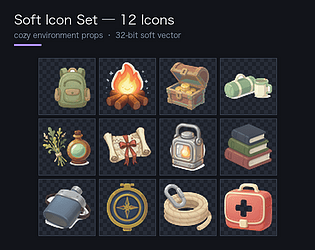
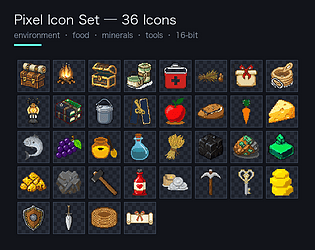
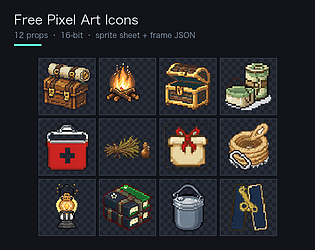
I'm producing 16-bit top-down pixel art packs (environment, food, minerals, tools) with sprite sheet + frame-coordinate JSON. Three are up now — 12 free, 36 for $9, and a 12-icon soft-vector set for $5:


https://yangjuejue.itch.io/pixel-icon-starter

https://yangjuejue.itch.io/pixel-icon-set-36

https://yangjuejue.itch.io/soft-icon-set-12


If you're surveying gaps, I'd genuinely be interested in what your series is missing — and if it lines up, you can tell me which items to prioritize before I make them, so you're not paying for stuff you already have.


Happy to swap notes on which props are hardest to find.

Put the whole set on one page so you can see whether the style fits before you buy anything.

48 icons across two sheets, on the same 64x64 grid:

- Pixel sheet — 36 icons (16-bit pixel art, 512x320)

environment props 12 · food 9 · minerals 5 · tools & weapons 10

- Soft vector sheet — 12 icons (32-bit soft rendering, 512x128)

cosy variants of the 12 environment props

Two sheets, not one, on purpose. Pixel art wants Point filtering; soft vector wants Bilinear. Put both on a single atlas and half of it will look wrong in-engine no matter what filter you pick.

What you get:

- both sprite sheets

- every icon already sliced to 64x64 PNG

- a frame-coordinate JSON for both (so you can slice by code, not by eye)

- Unity 2D and Godot 3/4 import steps, including the filter setting per sheet

The frame JSON is verified against the actual images — all 48 frame rectangles are 64x64, none of them run past the edge of the sheet, and no two share a position. The pixel sheet is 8x5 cells with the last row partly empty, which is normal for a 36-icon set on that grid.

Individual sets if you only need one style:

https://yangjuejue.itch.io/pixel-icon-set-36 (36 pixel icons, $9)

https://yangjuejue.itch.io/soft-icon-set-12 (12 soft-vector icons, $5)

Or the combined set with both sheets and the frame data in one download:

https://ugc-rate-calculator.app.workbuddy.host/?sharecode=2YK4REZ7K2

Licensed for personal and commercial games. Modify freely, no attribution required. Reselling the raw files is not allowed.

Happy to answer questions about the palette or the grid — and if you need a specific object that isn't in here, say what your game needs and I'll quote a fixed price.

Putting this here since this board is where people actually come looking for art help.

What I do: game-ready pixel art asset packs — environment props, food, minerals, tools — delivered as individual PNGs plus one combined sprite sheet plus a frame-coordinate JSON, so you can slice the atlas by code instead of hand-authoring it.

Everything is built to one spec per pack: a single 64x64 grid, one light direction, a hard 1px outline in a palette colour, a consistent baseline and margin. That's what stops a pack from falling apart when you lay it out in a tileset.

What already exists (free to download, no strings):

https://yangjuejue.itch.io/pixel-icon-starter — 12 props, $0

Two larger sets on the same grid:

https://yangjuejue.itch.io/pixel-icon-set-36 — 36 icons (environment + food + minerals + tools), $9

https://yangjuejue.itch.io/soft-icon-set-12 — 12 soft-vector icons in a different style, $5

If you need something that isn't in those packs, tell me what the game actually needs — which objects, what palette, what tile size — and I'll quote a fixed price for a custom set. A couple of things I get asked for: themed/regional prop sets, specific palettes to match an existing game, and 32x32 or 128x128 variants of the same grid.

I read every reply on this board, so if you're working on something and you post what you need, I'll come back to you with what I can do.

Also happy to talk shop on specs and pipelines — if you're a programmer building your own atlas tooling, the rules are the reusable part, not the PNGs.

I make both kinds, so people ask which one they should use, and the honest answer is that it depends on the game — not on which is "better".

Pixel art (hard 16-bit edges, limited palette)

- Reads best at its native grid. Mine are all 64x64 deliberately, so they tile with the rest of a 16-bit scene.

- Suits top-down RPGs, roguelikes, anything with a chunky grid aesthetic.

- Needs Point / Nearest filtering in-engine.

Soft vector (rounded, warm, anti-aliased)

- Reads well at any size — the same asset works at 32px and at 256px with no re-authoring.

- Suits cosy / management / life sims, anything with a rounded visual language.

- Needs Linear / Bilinear filtering. Forcing Point on it makes it jagged and broken-looking.

The mistake I see most often: mixing the two without a rule. A few soft icons floating inside a pixel tileset looks like the asset pack ran out, not like a decision. Either commit to one language, or make the split intentional — soft UI chrome over a pixel world is a legitimate and popular setup, it just has to look deliberate.

And the practical bit that actually decides it: filter mode. On both engines, switching an asset's filter is a one-line change, and getting it wrong is the #1 reason an asset "looks wrong" in-game. If something you bought looks soft and blurry, it is almost never the art — it's Point/Bilinear.

I ship both styles rather than picking one and calling it the only correct answer, because half the people downloading would have been sold the wrong thing. If you tell me your genre and target resolution I'll tell you honestly which to use.

The pixel side:

https://yangjuejue.itch.io/pixel-icon-starter (12 icons, free)

https://yangjuejue.itch.io/pixel-icon-set-36 (36 icons, $9)

The soft side:

https://yangjuejue.itch.io/soft-icon-set-12 (12 soft-vector icons, $5)

Curious what the rest of this board is working in — if you're doing cosy/soft art I'd genuinely like to see it, I've been mostly heads-down in 16-bit.

Not a pitch, a workflow tip — and there's a free pack at the end if you want one.

If you keep your game art as loose PNGs, every new asset means another manual step: open the image, hand-place it on the canvas, guess the pivot, and later re-do all of that when you change the resolution.

Shipping a sprite sheet plus a frame-coordinate JSON removes the guessing:

- One sheet image — every frame in a single file. One import, one draw call for a whole set.

- A JSON with each frame's rectangle — so the atlas can be sliced by code, not by eye.

The JSON is the part people skip, and it's the part that actually pays off. It lets you slice automatically at build time, re-pack a subset of frames without re-exporting the art, merge someone else's sheet with yours, or drive a runtime atlas in a tool like Godot or Unity.

Two things that matter more than they sound:

Filter mode is not optional. Pixel art needs Point / Nearest. Soft vector art needs Linear / Bilinear. This is the single most common reason an asset "looks wrong" in-engine, and it isn't the art — it's the filter.

Keep the grid uniform. Sheets only slice cleanly if every frame sits on the same cell with the same margins and the same baseline. If it isn't uniform, the JSON is what keeps you honest — it exposes the inconsistency instead of hiding it.

The free 12-icon pack below is built exactly this way (12 icons at 64x64, combined sheet, frame JSON, Godot + Unity import notes), so you can see the format before committing to anything:

https://yangjuejue.itch.io/pixel-icon-starter

Two larger sets use the identical structure if you need more:

https://yangjuejue.itch.io/pixel-icon-set-36 (36 icons, $9)

https://yangjuejue.itch.io/soft-icon-set-12 (12 soft-vector icons, $5)

If your engine or setup isn't covered by the README, say which one and I'll write it up.

Curious what other people are using for atlas generation — if there's a better pipeline than hand-rolled JSON, I want to know about it.

Dropping a small free set of 16-bit pixel art props here in case anyone needs game-ready icons without opening a paint program. **12 icons at 64x64** — trees, rocks, crates, potions, fences and similar top-down RPG props. Plus: - one combined sprite sheet - a frame-coordinate JSON, so you can slice the atlas automatically instead of hand-authoring it - a README with the Godot and Unity import steps One thing worth repeating because it trips up almost everyone: set the texture filter to **Point / Nearest**. Soft filtering on pixel art is the single most common reason a pixel asset looks wrong in-engine. Licensed for personal and commercial games (no reselling or redistributing the raw files). If it's useful I'd love the feedback — especially on things like "this palette is too muddy" or "these two objects belong in a separate pack". And if you need something that isn't in here, say what your game actually needs and I'll quote a fixed price for a custom set. Two bigger sets on the same grid if you want more: https://yangjuejue.itch.io/pixel-icon-set-36 (36 icons, $9) https://yangjuejue.itch.io/soft-icon-set-12 (12 soft-vector icons, $5 — a different style entirely, for cosy games) Feedback welcome, especially on which objects are missing.