
Indie game storeFree gamesFun gamesHorror games
Game developmentAssetsComics
SalesBundles
Jobs
TagsGame Engines

Orbital Bazaar — free browser card game: does the first port explain the first sale clearly?

A topic by bubenough created 2 days ago Views: 90 Replies: 7
Viewing posts 1 to 5

Hi! I'm bubenough, the creator of Orbital Bazaar. I’m looking for feedback on the first port, especially the moment you choose cargo, compare buyers, and make your first sale.

Play the free browser beta: Play Orbital Bazaar

The premise is simple: buy cosmic junk and find the buyer who values it most. You build a lot of one or two finds, add a bargaining card if it helps, and try to leave enough credits for the journey. The short solo route has five ports. You don't need a download or a ChatGPT account.

For this test, please start a new solo voyage in English, leave the guided tutorial on, and play through the first port. Fullscreen makes the trading table easier to see.

Three things I'd like to learn:
1. Before the first sale, could you tell what to click next? If not, which instruction or screen lost you?
2. Could you explain why one buyer offered more for your selected item than another?
3. After the tutorial ended, did you know what you wanted to do at the next port—or did the interface still feel overwhelming?

Your browser, screen size, and the point where you stopped would help me reproduce any problem. A short answer to even one question is useful; no recording is required.

AI disclosure: the game was developed with AI assistance, including illustrations, writing, English localization, and code. The procedural market combines a finite catalogue using game rules; it does not generate content through an AI service during play.

Thanks for taking a look. I'm particularly interested in places where the tutorial asks you to make a decision before you've understood it.
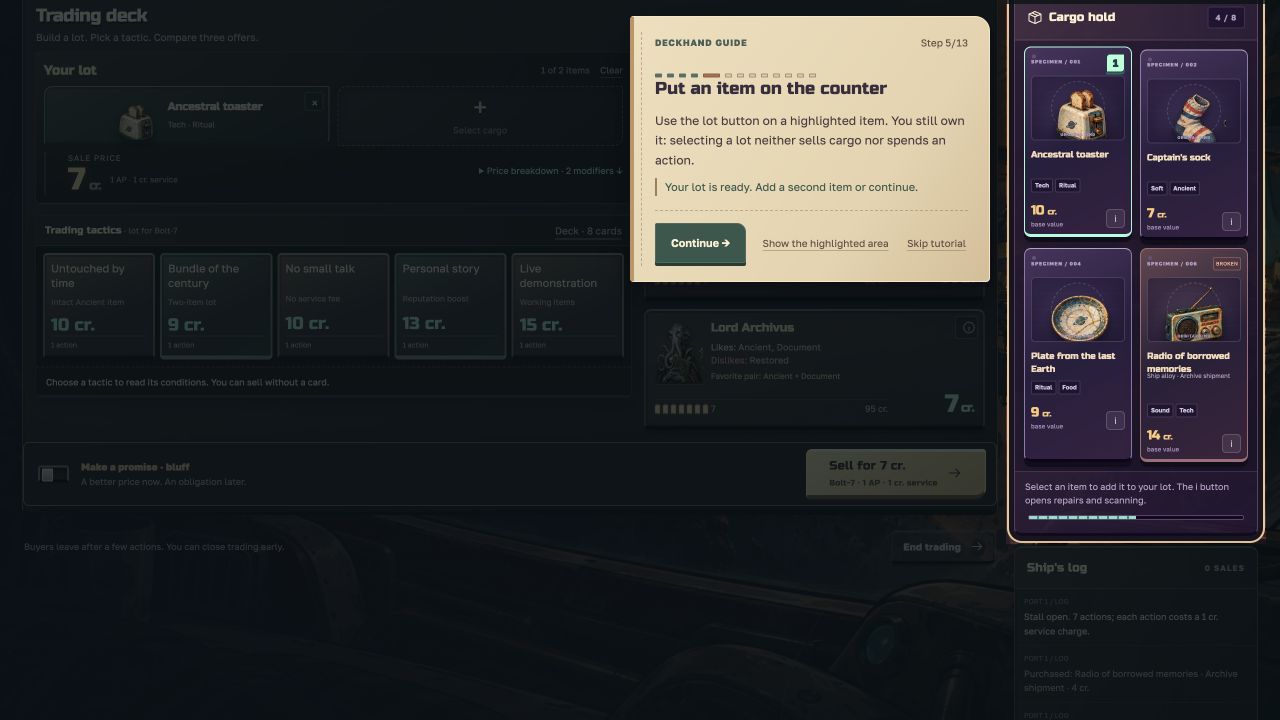
Hi! I played the first port with the tutorial on, in English, Chrome on a Mac (window about 1280x730), and went on to the second port.

1. Before the first sale I mostly knew what to click. Two moments made me stop:

  • Step 3 says "Buy it", but the big button is "Trade with starting cargo". I wasn't sure which one the tutorial wanted, so I bought the mushroom. After buying, the grid moved and my mouse ended up on the Buy button of another item, so it's easy to buy twice by accident.
  • Step 5 talks about the "lot button", but I couldn't find a button with that name. Clicking the card worked.

Also, the mushroom the tutorial highlights shows up as BROKEN in my hold, and nothing told me what that means.

2. Not completely. My toaster has Tech and Ritual. Bolt-7 likes Tech and offered 7, Sister Umbra likes Ritual and offered 11. I couldn't tell why Umbra pays more. Seeing all three prices change when I picked a tactic was really clear though, I liked that a lot.

3. At the second port I knew the plan (match tags, sell to the best buyer), but there's a lot on screen at once: port signal, outfitting, sockets, sellers with inspection fees, loan, debt. I ignored most of it. Maybe open those one at a time over the first ports?

One more small thing: in the profession window the Cast off button was below the fold for me, I had to scroll the popup to find it.

The art and the item names are great, "Captain's sock" made me smile. Good luck with it!

(+1)

Thanks! We’re already working on the fixes.

AI-assisted desktop UI check, English, Generalist, guided tutorial on: completed the first port and reached Forge by the red star (port 2).

The path worked: bought Cable of unknown purpose for 4 cr., added it to the lot, selected Bolt-7 (9 cr. versus the other buyers’ 1 cr.), used Live demonstration to bring the offer to 17 cr., then sold. The sale screen’s action/service-cost line and the post-sale change to 70 credits made the consequence clear. After taking Untouched by time, departure charged 8 credits and left 62 at the second port.

Two wording suggestions: step 5 says “lot button,” while the control is “Add to lot”; using the actual control label would make it easier to follow. At step 6 Bolt-7 was already visibly selected, yet Continue stayed disabled until it was clicked again. Either allow the default selection or ask explicitly to confirm it. The second port also opens vendors, outfitting and signals together; one short reminder of the buy → trade → depart loop would help at that handoff. This check cannot establish how overwhelming it feels to a fresh human player.

Interested in a reciprocal opening check? Recoil Foundry is a free desktop-browser action roguelike. Up to ten minutes: could you understand recoil movement and the first upgrade choice, and what would make you keep playing or stop? The in-game Feedback menu links to the discussion and includes an editable run summary.

Thanks for the detailed check. The updated build is live: step 5 now uses “Add to lot”; step 6 lets you confirm the selected buyer and their current offer without clicking the buyer again. From port 2, the next trading action is highlighted and optional ship systems start collapsed. I checked all 13 tutorial steps through the itch.io iframe in English and Russian.

Tested in Brave on macOS, English, Generalist, with the guide on, in a window about 1000 pixels wide. I stopped on reaching port 2.


The first sale worked. I bought Diplomat's wig for 3 credits, matched Ancient to Lord Archivus, and saw 8 compared with 4 from the other buyers. Personal story raised the offer to 14. The service fee of 1 left 68 credits, then the flight cost of 8 left 60. Seeing the buyer, action and fee together on the sale button made the cost clear.


One readability suggestion for step 13: the Next port button is highlighted, but the departure cost line stays dimmed under the tutorial overlay. Putting the fare on the highlighted button, or including that cost line in the highlight, would make the final decision easier to read.


At port 2, the tag matching gave me a clear next step, compare cargo with the new buyers while keeping the 10 credit departure reserve.

Thanks for catching that. The updated build is live: the highlighted “Next port” button and the guide’s departure button both show the actual fare. The guide also shows your current credits and the balance after departure, with a clear message if you cannot afford the flight. I checked all 13 tutorial steps through the itch.io iframe in English and Russian.

2.6 playtest update — is the three-presentation limit clear?

Thanks for the first-port reports above. The public game has since moved to 2.6, with a longer solo expedition. I'd like a fresh check of one trading decision, rather than asking anyone to finish the campaign.

Try one port and answer this: before you showed a lot to a buyer, was it clear that a new lot/buyer combination uses one of your three presentations, while revisiting the same unchanged lot with that buyer is free? If that surprised you, which label or moment caused the confusion?

Play the free browser game →
Start a new solo run: Cast off → Generalist → Cast off. Enable Step-by-step guidance before the second Cast off if you want the first-sale tutorial. Older saves retain their original rules.

For a small optional goal: make a sale and reach port 2 with at least your starting 58 credits, without a new loan. You can reply with your item, sale price, and credits after the flight—or just tell me where you stopped. Your browser and approximate window size help with interface problems. No recording needed.

Русский тоже подойдёт: интересует, понятно ли до нажатия, когда расходуется один из трёх показов лота. Для нового рейса: RU → «Отдать швартовы» → «Универсал» → «Отдать швартовы»; подсказки можно включить перед стартом. Достаточно первого порта и одного ответа.