
Indie game storeFree gamesFun gamesHorror games
Game developmentAssetsComics
SalesBundles
Jobs
TagsGame Engines

Simpl_pseudocode

18
Posts
8
Topics
A member registered Jun 20, 2017 · View creator page →

Creator of

Recent community posts

Hi everyone! I'd like to share a project I've been working on: **SIMPL**, a free interpreted language and IDE that runs pseudocode exactly as it's written.

It's built on the official Cambridge pseudocode guide (AS & A Level Computer Science, 9618), which thousands of students use for their exams but usually can only write on paper. With SIMPL they type an algorithm, press Run, and see the result, or an error explained in plain words.

A few things that might interest fellow devs:

• The guide is a spec meant for paper, full of gaps: SIMPL fills them as a strict **superset**, and a "Cambridge strict mode" lists every extension a program uses, with the guide section it refers to

• A full IDE: syntax check while typing, a debugger with Step Over/Into/Out, and a **trace table filled in automatically** as the program runs

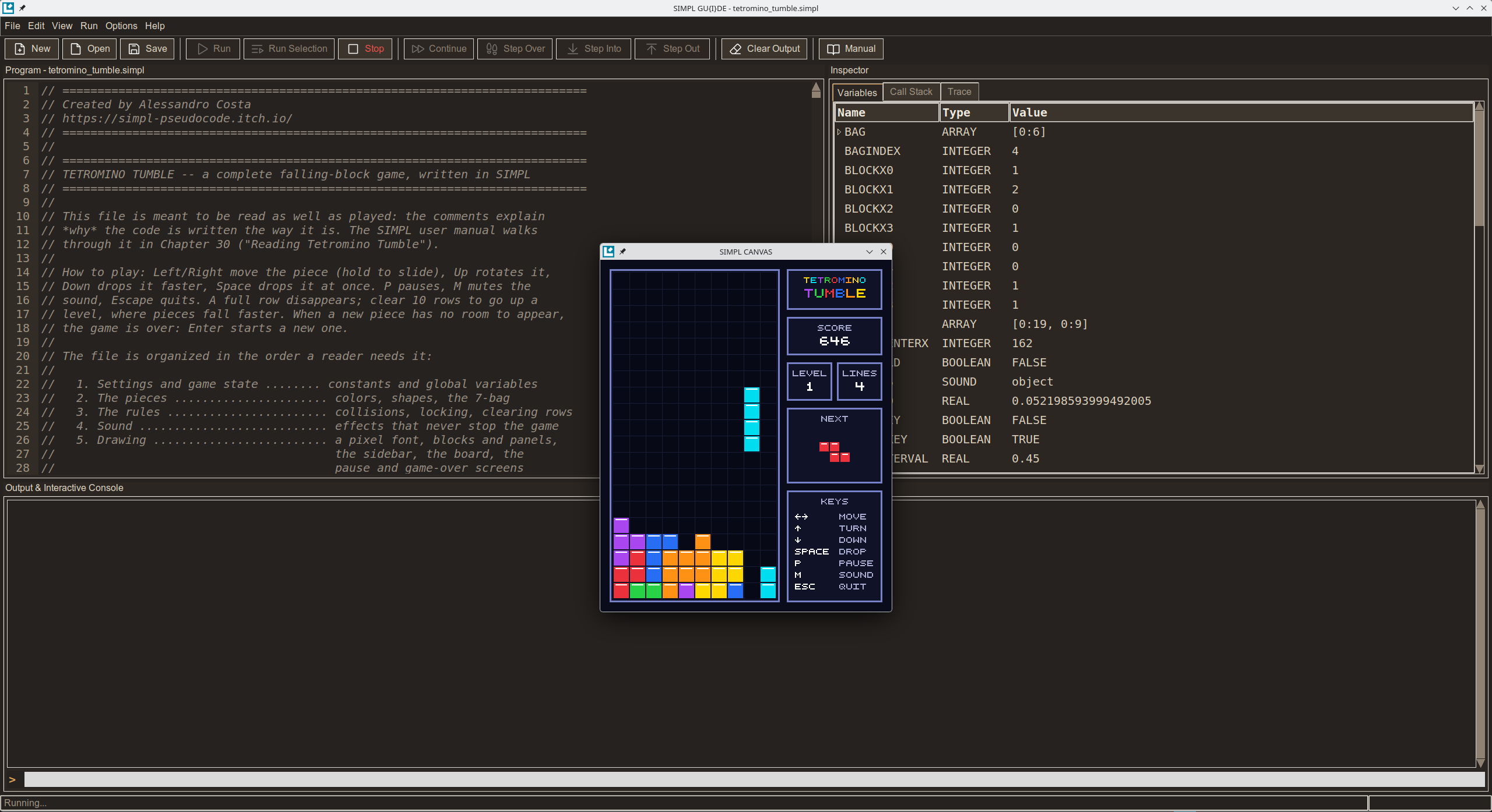
• Classes, inheritance, pointers, records, files, plus graphics, sound and keyboard input: the sample programs include a small BASIC interpreter and a falling-blocks game, both written in SIMPL itself

• Free, offline, no installation, Windows and Linux

👉 https://simpl-pseudocode.itch.io/simpl

One small favour: SIMPL is free and aimed mainly at young students, so being discovered is the hardest part. If you try it and genuinely find it useful, a like or a short review on AlternativeTo would really help it reach the people it's made for:

https://alternativeto.net/software/simpl--pseudocode-interpreter/about/

Only if you think it deserves it, of course. Feedback of any kind is just as welcome. Thanks for reading!
Thank you, I figured you would, even though I know it will likely accomplish little to nothing (through no fault of yours, of course).

Truth be told, that wasn't even the main point of this thread. My goal was to voice my frustration over the very fact that, as you mentioned, the staff 'doesn’t say much' when, in my view, they should be communicating far more instead of letting developers' concerns drop or taking weeks or months to address tickets.

Even if a mistake was made during the app's publication, there should be a clear, transparent, and swift process to identify the issue so it can be fixed. For example, developer-only diagnostic tools or even a simple notification showing your position in the moderation queue along with an estimated wait time. Instead, there is complete silence: you submit your release and just hope someone gets around to it eventually.

It pains me to say this, but it’s completely unprofessional. It might be acceptable on an amateur hobby site, but not on a platform like itch.io. And I say this as an entrepreneur who manages similar operational dynamics on a daily basis.

There’s no need to reply; I know full well you can't tell me anything beyond what you've already shared, and I'm not expecting answers from you that you couldn't provide even if you wanted to. I understand your position.

(1 edit)

In Italy we have a saying: "Thinking the worst is a sin, but you're usually right." It's hard not to wonder if those rare public admin responses in cases of clear bad faith are chosen specifically to show that the fault lies with the developers rather than with an inefficient system.

As far as I'm concerned, I know 100% that I acted in complete good faith and that my project is totally transparent. So, let's wait and see how things develop.

(2 edits)

Just to clarify, my account isn't limited or banned, nor was my app ever de-indexed. This is simply my very first release, and it hasn't been indexed at all yet.

I completely understand that this forum is mostly run by the community and that support is the official channel. However, the reason many end up posting here is that emails sent to support often go unanswered, so the forum ends up being the only place to get any visibility.

While I didn't originally intend to create a standalone thread, this post is meant to be a direct check on my project's current status, just like many other similar requests in this section.

In any case, to give some context to my points, the (now closed) thread I was participating in is this one: /t/6950376/game-not-indexed-for-50-days-email-ticket-401859-ignor...

I didn't intend to open a dedicated thread, but since the admin felt it necessary to close the one I was participating in, without actually addressing the points raised (which I believe would have been appropriate, without trying to preach to anyone) regarding the poor communication between developers and the staff itself, I will go along with the current trend and ask my question here.

Why hasn't my app been indexed yet? It is completely safe, free, and suitable for everyone (in fact, it's mainly aimed at young students), with no caveats or red flags. This is despite the fact that I've double-checked multiple times and am certain I followed all the publicly available instructions. Meanwhile, newly registered accounts like mine have had their games indexed in a very short time.

As I mentioned in the other thread, the issue isn't even the wait itself, but the uncertainty surrounding the outcome and the lack of clear updates on the process. I would appreciate a clear response on this matter, and at this point, I assume many others would too.

I want to emphasize that this is not meant to be arguing for the sake of it, but rather constructive criticism. Simply reading through this section clearly shows that there is a major issue here, one that shouldn't be ignored any longer but addressed, at the very least by starting an open and direct dialogue about it.

Thank you for your attention.

Ticket: 408086

App: https://simpl-pseudocode.itch.io/simpl

Thanks for sharing this, and honestly, the comparison with Newgrounds says it all. I recently had a similar experience with AlternativeTo.net, and I was no longer used to such an excellent level of user support, which makes the comparison with what we're experiencing here even more jarring. 50 days of complete silence for a support ticket isn't just a delay, it proves the exact point about the lack of transparent systems and standard procedures I mentioned earlier.

As I said, I'm not going to stress over this long-term since moving elsewhere is always an option, but it really is a shame to see independent creators who put genuine effort into their projects being treated with this level of total neglect since, at the end of the day, they are the ones who created the content that allowed Itch.io to become what it is today. I'm not even angry, just deeply disappointed.

(1 edit)


SIMPL 1.1 is out! It's the first big update since launch, and it's about two things: seeing what your program does while it runs, and getting help while you write it. Programs written for SIMPL 1.0 run unchanged.

https://simpl-pseudocode.itch.io/simpl

What's new

Trace tables, filled in for you

Tick View > Trace Table and a new Trace tab fills in your program's trace table while it runs, just like the ones you draw by hand in a dry run: one column per variable, OUTPUT last, a new row at each round of a loop. Hover over a row to see which lines wrote it, double-click a cell to jump to its line, and export the table to a spreadsheet, a CSV file or a printed page next to the program. It's made for short programs, like the exercises of the manual.

Debugger: Step Over, Step Into, Step Out

Step (F10) now steps over routine calls, Step Into (F11) follows a call inside, and Step Out (Shift+F11) comes back to the caller. At every pause, the variables that just changed are highlighted, locals and globals are shown apart, and you can click any call in the Call Stack to look at its own variables. Recursion has never been easier to follow.

Mistakes caught as you type

A second after you stop typing, SIMPL underlines the first syntax error in red and tells you what's wrong, often with a "did you mean...?" for a misspelt keyword or name. Keywords are written in capitals and <- becomes ← as you type, closing words like ENDIF line up with their block by themselves, and the block the cursor is in is shaded and named above the editor. Every one of these can be turned off in the new Options menu, to practise as in the exam.

From an error to its explanation

Error messages are clearer and all have the same short shape: what went wrong, where, the line quoted with ^^^ under the words in question, and a hint. At the end of each one, More › opens the User Manual at the explanation of that kind of error.

A better User Manual

The manual now has a window of its own that you can keep on top of the editor. All 205 exercises were reviewed (96 rewritten or replaced, with their solutions), the Bigger picture sections were rewritten, and the appendix for Cambridge students follows the 2027-2029 syllabus.

Tetromino Tumble, remade

The sample game has a brand-new look. If you're upgrading from 1.0, see below how to get it.

And also

File > Open Recent and Save As, Go to Line, Toggle Line Comment, a right-click menu in the editor, reorganized menus, more checks in Cambridge Strict Mode, colors reviewed for legibility, and a long list of fixes. Everything is in the full list at the end of this post.

Upgrading from 1.0

  1. Download SIMPL 1.1 and put the new simpl.exe (Windows) or simpl.appimage (Linux) in the same folder as the old one, replacing it. Your settings, programs and libraries live next to it, and they are kept.
  2. To get the new Tetromino Tumble: SIMPL never overwrites a file that is already in your programs folder, because it might be one you changed. So rename the old one first, for example programs/tetromino_tumble.simpl to tetromino_tumble_1.0.simpl, then start SIMPL 1.1: it copies the new tetromino_tumble.simpl into the folder at startup. Your renamed copy stays as it was.

If you put SIMPL 1.1 in a new, empty folder instead, it starts with fresh copies of everything, Tetromino Tumble included: just copy your own programs over from the old programs folder.

Thanks for using SIMPL! If you find a bug or have an idea for the next version, leave a comment below.

Full list of changes

Writing code

  • Syntax check as you type. About a second after you stop typing, the first syntax error is underlined in red, its line number turns red, and the status bar says Syntax error, line N: hover for the message, click to go to the line. What you are still writing is not reported yet. Turn it off in Options > Check Syntax While Typing (to practise as in the exam).
  • "Did you mean...?" A misspelt keyword (OUTPT X, ENDIFF) or a name close to an existing one gets a suggestion: did you mean OUTPUT?, Did you mean Total?
  • Keywords in capitals and ← as you type. if becomes IF and <- becomes ← as soon as the word is finished, never inside strings or comments. Options > Uppercase Keywords and ← While Typing turns it off.
  • Closing words line up by themselves. ENDIF, NEXT, ELSE, UNTIL... move back to the indentation of their block as soon as you type them.
  • The block you are in. The lines of the block around the cursor are shaded, and the title above the editor lists the blocks you are inside (average.simpl › FOR I (line 4) › IF Mark >= 50 (line 6)). Options > Show Current Block turns it off.
  • Format Code (Ctrl+Shift+F) now also writes keywords in capitals and ←, and puts one statement per line.
  • Toggle Line Comment (Ctrl+/) comments or uncomments the selected lines; Go to Line (Ctrl+G) jumps to a line by its number.
  • Right-click menu in the editor, the console and the search boxes: Undo, Redo, Cut, Copy, Paste, Select All.
  • Typing. Quotes are paired only in code (not in comments, strings or words like Newton's); Enter at the start or in the middle of a line no longer leaves stray spaces.
  • Breakpoints follow their lines when you add or remove lines above them, and go away with a deleted line.

Running and debugging

  • Step Over, Step Into, Step Out. Step (F10) is now Step Over: a routine call runs in one go. Step Into (F11) goes inside the routine; Step Out (Shift+F11) finishes it and pauses back where it was called. F5 means Continue while paused.
  • What changed is highlighted. At each pause, the variables whose value changed are highlighted in the Variables panel, and the status bar lists them.
  • Local and global variables apart. Paused inside a PROCEDURE or FUNCTION, the Variables panel shows Local and Global groups; a global hidden by a local of the same name is greyed out.
  • Every call can be inspected. The Call Stack lists every call in progress with the line it is waiting at; click one to see its variables and its line. The tab's title counts the calls.
  • Clearer cues. An arrow ▶ marks the line about to run; the line number under the mouse shows where a click sets a breakpoint (also F9 on the cursor's line, and Run > Remove All Breakpoints).
  • Stop has a key of its own: Shift+F5.
  • The editor is read-only while a program runs (you can still select, copy and set breakpoints), so what you see is always what is running.
  • The debugger no longer stops inside IMPORTed libraries: their routines run in one go.

Trace Table (new)

  • View > Trace Table adds a Trace tab that fills in the program's trace table while it runs, like the ones drawn by hand in a dry run: one column per variable (and per array element or field that gets a value), OUTPUT last, a new row at each round of a loop.
  • Hover over a row to see which lines wrote it; double-click a cell to go to its line; while stepping, the row being written is highlighted.
  • Right-click a heading to hide, show or move columns. Export copies the table (it pastes as a table into a spreadsheet), saves it as CSV, or prints it with the program.
  • It suits short programs, such as the manual's exercises: a program runs more slowly while the table records. It records up to 1,000 rows and 60 columns; programs with graphics (CANVAS) and IMPORTed libraries are not traced. A short window explains this the first time.

Error messages

  • Clearer reports. The heading says what kind of error and where (Runtime error on line 7: the program stopped); the line is quoted with ^^^ under the words in question; the hint is set apart. Every report has the same short shape, in the IDE and from a terminal.
  • From the error to its explanation. More › at the end of each report opens the User Manual at that kind of error. Appendix C now explains each of the 13 kinds of error.
  • Names as you wrote them. Messages say Cannot assign to Age, not AGE.
  • An unterminated string is reported at its opening quote, not at the end of the program.

Cambridge Strict Mode

  • Now also reports several statements on one line, & used with a value that isn't text ("Age: " & 13), and SELF inside a class.
  • The menu entry is now Options > Cambridge Strict Mode.

Files, menus and toolbar

  • File > Open Recent lists the last ten programs; File > Save As (Ctrl+Shift+S) saves under another name.
  • File > Open clears the console and the variables, as File > New does.
  • Menus reorganized, as in VS Code: commands in the menu of what they act on, settings together in a new Options menu; Trace Table is in View; Edit has Cut, Copy, Paste and Find.
  • One name per command: the toolbar uses the menus' names (Run, Stop, Step Over...). Clear Variables is in the Run menu, Find in the Edit menu (Ctrl+F).
  • Find bar more compact, always at the left of its panel.
  • New keys: Shift+F5 Stop, F9 breakpoint, F11 / Shift+F11 Step Into / Out, Ctrl+Shift+S Save As, Ctrl+G Go to Line, Ctrl+/ comment, Ctrl+Q Exit, Ctrl+Shift+Z Redo. Help > Keyboard Shortcuts lists them all.

User Manual

  • A window of its own: it can go behind the IDE, be minimized, or stay on top (Keep on Top); F1 brings it back where you left it. In a narrow window, the contents become a drawer.
  • Title page entry at the top of the contents, to get back to the beginning.
  • Tables in the text's font, fitted to the page; the manual opens faster.
  • Content. The bigger picture sections rewritten (other languages, history, the real world); all 205 exercises reviewed, 96 rewritten or replaced, with their solutions; new A SIMPL extra boxes; Appendix H, for Cambridge students, rewritten for the 2027-2029 syllabus; every message quoted as SIMPL writes it now.

Look and feel

  • Colors reviewed for legibility in both themes: strings green, numbers purple, every text at least 4.5:1 contrast.
  • Empty panels say what will appear in them; scroll bars appear only when needed; the open Inspector tab stands out; the number of the cursor's line is shown in full-strength text.
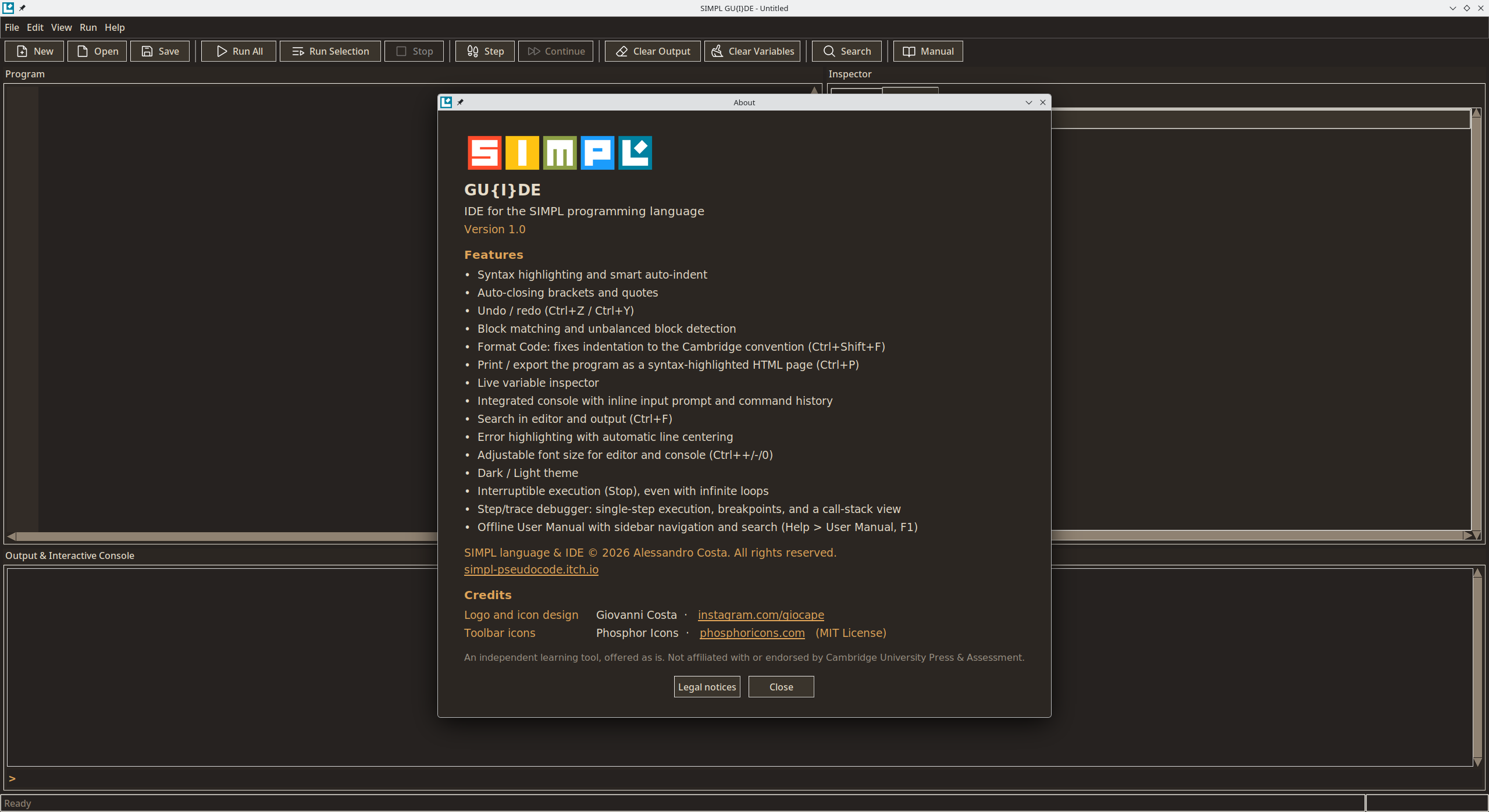
  • About lists the features in four groups.

Programs

  • Tetromino Tumble has a new look (panels, a sidebar with score, level, next piece and keys). Same gameplay and scores. See Upgrading from 1.0 to get it.

Fixed

  • The IDE did not start with Tk 9.
  • A line starting with the word EOF silently ended the program.
  • A selection was hidden under the line highlights.
  • Undo after opening a file emptied the editor; Redo after New brought the old program back.
  • Paste did not replace the selected text (Linux); Ctrl+Y pasted instead of redoing, Ctrl+W cut, Ctrl+O split the line (Linux).
  • F10 also opened the File menu.
  • Step paused twice on a line with NEW or a method call.
  • A routine of your program called by a library was reported as an error in the library.
  • Saving a new program while paused broke stepping.
  • Run Selection highlighted the wrong words in an error.
  • The mouse wheel over the line numbers did not scroll the editor.
  • Table headings and selected console text were hard to read.
  • A minimized User Manual stayed in the taskbar when F1 asked for it.
  • The manual's contents did not follow the last sections, and its bar showed only symbols at first.
  • The printed page colored numbers inside strings and comments.

I would also like to clarify that the core issue isn't even the wait to see the application published, but the lack of clear and transparent timelines and procedures, not knowing whether it will take hours, days, months, or if it will happen at all, and if so, why it wasn't published or why it's blocked. As I mentioned, the insufficient and sometimes contradictory communication is the heart of these complaints, and until this is resolved (if it ever will be), there can be no real improvement.

Just to give an example: after reading through multiple threads carefully, I discovered that there is no consistent, precise rule. Sometimes apps from newly registered users are indexed almost immediately, while other times apps from veteran users remain pending for a long time or get de-indexed after having been indexed, all without any clear explanation. I hope people realize that this can only breed resentment among developers.

(1 edit)

Honestly, I don't believe that threats, appeals, or coaxing of any kind will yield any results. If I understood correctly, the moderator isn't an employee but a volunteer community member, so there's only so much he can do. Frankly, if that's how things stand, I don't envy him at all, since I would never put myself out there like that for free for a company that acts this way.

We shouldn't even be here discussing these issues, simply because they shouldn't exist in the first place. It's unacceptable for an online store not to have clear policies and precise rules to manage the indexing of published applications. It might seem like they do, but in practice they don't, and the moderator's terse, brief responses prove it. Requests sent to the admins are like a black hole with zero feedback, and it's only natural to feel frustrated by this lack of communication.

Frankly, though, this is more their problem than mine, as I wouldn't hesitate to move elsewhere if it comes to that. I'm just disappointed because I had high hopes and expectations for this platform, which have been completely let down up to this point. Truly a shame.

I hadn't had the chance to carefully read through this section yet, but now that I have, I couldn't help but notice a fairly widespread issue regarding application indexing. The standard procedure where moderators submit the issue to the admins doesn't seem to yield particularly positive results. Perhaps all of this is also caused by suboptimal communication and partial, likely insufficient information about internal procedures and the potential pitfalls one might (even accidentally) run into.

I fully understand that submissions are overwhelming (and AI slop certainly hasn't helped in that regard: I don't mean AI-assisted projects, but full shovelware generated entirely by it) and manpower is likely limited. However, I believe a solution needs to be found, as this negatively impacts how serious developers perceive the platform.

In fact, given that my ticket has been unresolved for days (like many others) and I don't intend to start my own thread right now (as I suspect it would be useless to the cause, as seen here), I was starting to consider whether to delete my account and publish on Steam instead, even paying the $100 fee despite it being a free project. It would be a shame, since I had chosen Itch.io partly out of "ethical" reasons, wanting to support a certain vision of an online store. Still, I think a minimum level of consideration (speaking generally, not just about my case since I've "only" been waiting for a week) should be expected; at least, that's my view.

Ah okay, then I can set my mind at ease, because it hasn't even been a week since I published my application and I've already written to support (without receiving a reply, which I see has happened to others as well). I presume that in the age of AI agents, they could design something to help those in charge (especially if they are understaffed) process the high volume of submissions—or at least make it crystal clear that it's not a matter of waiting a few days, but most likely months, so at least people are aware of it.


Hi everyone! I'm the developer of SIMPL, and I'd love to show you what I've been building.

Everyone who has ever sketched an algorithm has written pseudocode: plain, readable code meant for people, not machines. SIMPL makes it run. Write IF…THEN, FOR…NEXT, WHILE, press Run, and watch your idea come to life. Then keep going, all the way to graphics, sound and complete games.

🎓 Faithful to the Cambridge guide

  • Runs the official Cambridge pseudocode (IGCSE, O Level, AS & A Level) exactly as written on the exam paper: records, files, classes, pointers, sets, enumerations.
  • Cambridge strict mode flags anything that goes beyond the guide, with the section it refers to.

🚀 …and far beyond it

  • CANVAS: windows, drawing, animation, keyboard input.
  • SOUND: notes, melodies and retro chip-style effects.
  • IMPORT: your own modules plus a standard library.
  • BREAK, CONTINUE and EXIT for finer loop control.

🧰 A complete IDE, ready out of the box

  • Editor with syntax highlighting and an interactive console.
  • Step-by-step debugger with breakpoints and a live view of every variable: a trace table that fills itself in.
  • Error messages in plain English that point to the line and say what to fix.
  • Light and dark themes.

📖 A language and a book, written together

  • A 31-chapter manual, from your first program to recursion, linked lists, OOP and games.
  • Press F1 and it opens beside your code. Every example has an Open in editor button, and every example is tested.
  • Exercises with worked solutions, plus guided projects (a quiz game, Snake from scratch).

🕹️ See how far it goes

Two complete programs written in SIMPL, commented line by line:

  • Tetromino Tumble: a full falling-block game with music and sound effects.
  • SIMPLR: a 1980s-style BASIC interpreter, with numbered lines, GOTO, GOSUB and a READY. prompt. A programming language written in a programming language.

✔ Free · ✔ Nothing to install · ✔ Windows & Linux · ✔ Works fully offline

👉 https://simpl-pseudocode.itch.io/simpl

It's version 1.0, so I'd really value your feedback: what you like, what's missing, what breaks. Happy to answer any questions!

(1 edit)

Written something in SIMPL you're proud of? A game, a solution to a paper question, a useful little tool, a clever algorithm — share it here!

Post the code (as text), a short description, and a screenshot if it uses graphics. It's also a great place to learn from each other: if you like someone's program, tell them — and if you see a way to improve it, suggest it.

(2 edits)

Not sure how to do something in SIMPL? Ask here.

To get a useful answer faster:

  • Say what you're trying to achieve and what happens instead.
  • Include any error message exactly as SIMPL shows it.

Many answers are in the User Manual that comes with SIMPL, so it's worth a quick look first. 

(1 edit)

Have an idea that would make SIMPL better? Share it here!

A good request explains what you'd like to do and why. A short example of how you imagine it working (a few lines of code, or a description of the GUI) helps a lot.

I can't promise to implement everything, but every idea gets read, and the ones that fit SIMPL's goals are the most likely to make it in.

(1 edit)

SIMPL aims to run Cambridge pseudocode exactly as written in the official guide. If you find a construct from the guide that SIMPL rejects, or that behaves differently than the guide describes, please report it here.

Please include:

  • The pseudocode (as text).
  • What the guide says it should do, and which section of the guide (and which syllabus: IGCSE/O Level 0478/0984/2210 or AS & A Level 9618).
  • What SIMPL does instead.

Tip: turn on Cambridge strict mode to see which parts of a program go beyond the official guide.

(1 edit)

Found something that doesn't work as expected? Please report it here.

To help me reproduce and fix it quickly, include:

  1. What you did — the smallest program that shows the problem, pasted as text.
  2. What you expected to happen.
  3. What happened instead — the exact error message or output (copy and paste it).
  4. Your system — Windows or Linux, and the file you downloaded.
  5. GUI or command line?

If SIMPL showed an internal error message (rather than a normal SIMPL error about your program), please also attach the error log from the simpl_settings folder next to the program: it tells me exactly where things went wrong.

One bug per post, please.